What Are Ad Extensions? Get Better Clicks Than an Agency
- Oct 6, 2025
- 9 min read
Think of a standard Google Ad as a basic, black-and-white business card. It gets the job done—it has your name and a headline. That’s it.
Now, imagine transforming that simple card into a full-color, glossy brochure packed with service highlights, your phone number, and even a map to your front door. That’s what ad extensions do. They’re powerful add-ons that bolt extra information onto your ad, making it bigger, more useful, and far more likely to get clicked—all at no extra cost.
What Ad Extensions Are and Why They Matter
So many business owners get short-changed here, especially when they're working with big, impersonal agencies. Those guys often just flip a switch for "automated extensions" and call it a day, applying a generic, ineffective template to every single account. It's a passive, lazy approach that leaves a ton of money and opportunity on the table.
As a hands-on consultant, my approach is the exact opposite. I don't use templates. I manually build out extensions that are perfectly synced with your specific business goals, your ad copy, and your landing pages. Every single piece of your ad needs to be pulling its weight. That's the difference between agency bloat and expert focus.
Turning Ads into Action-Packed Tools
At their core, ad extensions are all about giving searchers more reasons to choose your ad over a competitor's. They're shortcuts, providing valuable info that makes the user's decision-making process dead simple. Getting a handle on what ad extensions are is non-negotiable, especially when you're trying to build effective small business ads.
There are a whole host of extension types, each built for a different job. You can add extra links, callouts with key benefits, a click-to-call button, or your physical address. The goal is to turn a static text ad into an interactive, dynamic tool. And the data backs this up: ads loaded with multiple extensions consistently see a click-through rate boost of 10-20% (or even more) compared to ads without them.
To help you visualize this, here's a quick rundown of how extensions work together to create a better ad experience.
Ad Extensions at a Glance
Component | Purpose | Primary Benefit |
|---|---|---|
Standard Ad | Delivers the core message and link to a landing page. | Establishes basic presence and relevance. |
Ad Extensions | Add extra, relevant information directly to the ad. | Increases ad visibility, provides user shortcuts, and boosts CTR. |
Combined Ad | Creates a large, feature-rich ad that dominates SERP space. | Delivers a superior user experience and pushes competitors down. |
This combination is what takes an average ad and makes it a powerhouse.
This screenshot from Google itself shows how a few different extensions can work together to create a huge, super-informative ad.
You can see how the location, sitelinks, and call extensions all combine to totally dominate the search results, literally pushing the competition further down the page. That's the power you're tapping into.
The Unfair Advantage Ad Extensions Give You
Using ad extensions isn't just some technical box-ticking exercise—it’s a powerful competitive weapon. Think of it like claiming more digital real estate on the search results page.
Every extension you add makes your ad physically larger, pushing your competitors further down the page and demanding more attention from potential customers. This increased visibility immediately translates into better performance.
The data is overwhelmingly clear on this. Ads with well-chosen extensions can boost Click-Through Rates (CTR) by 10% to 20% compared to those without. And for mobile users—who now make up over 60% of all searches—extensions like call buttons give them an instant way to connect, drastically improving engagement.
The Consultant Edge Over Bloated Agencies
This is where focused, expert management makes all the difference. An overpriced, bloated agency often applies a one-size-fits-all, "set it and forget it" template to every account. They'll flip on some automated extensions and move on, completely missing the strategic opportunity because their model is built on volume, not individual performance.
As an individual consultant, my approach is surgical. I don’t just turn extensions on; I craft them to align perfectly with your campaign’s specific goals, ad copy, and landing pages. This meticulous setup sends strong relevance signals straight to Google.
Google rewards this relevance with a higher Quality Score. This isn't just a vanity metric—it directly leads to better ad positions and a lower Cost-Per-Click (CPC). You end up paying less to get more prominent placement. You stop funding an agency's coffee machine and start funding your growth.
This creates a powerful positive feedback loop where your ads become more efficient and effective over time. It’s a strategic advantage that prioritizes your ROI, an approach often lost in the high-volume, low-touch model of overpriced agencies. A higher CTR is a key part of this cycle, and you can learn more about how to improve click-through rates in Google Ads in our dedicated guide.
Choosing the Right Tools for the Job
Think of ad extensions as specialized tools in a toolbox. You wouldn't use a hammer to turn a screw, and you definitely shouldn't use a generic, one-size-fits-all approach for your ads. Not all extensions are created equal, and knowing which one to use for a specific goal is where an expert strategy completely demolishes the cookie-cutter agency model.
This is where a dedicated consultant makes all the difference. Instead of just flipping on every automated feature and hoping for the best, I dig into your unique business needs to select the perfect combination of extensions. The goal isn't just to add more text; it's to create a bigger, more compelling ad that speaks directly to your ideal customer.
Matching Extensions to Your Goals
Let's break down how to use some of the most powerful ad extension types in the real world. This isn't just theory—it's about driving tangible results for your business.
Sitelink Extensions: Use these when you want to steer users toward specific, high-value pages on your site. For an e-commerce store, that means direct links to “Men's Shoes,” “Women's Sale,” or “New Arrivals.”
Call Extensions: These are an absolute must for any service-based business that depends on phone calls. A local plumber running ads for emergency repairs can get immediate calls with a single tap from a searcher's phone.
Location Extensions: Perfect for any business with a physical storefront. A restaurant can use this to show their address, hours, and a map pin, making it incredibly easy for hungry customers searching nearby to find them.
Callout Extensions: Use these to highlight key benefits or offers that apply across your entire business. Think “Free Shipping,” “24/7 Customer Support,” or “Family-Owned Since 1998.”
Structured Snippets: These neatly organize information into predefined categories. A university could list its degree programs (“Courses: Business, Engineering, Arts”), making its offerings instantly clear to prospective students.
This infographic lays out the dramatic performance difference between ads with and without strategically chosen extensions. The numbers don't lie.
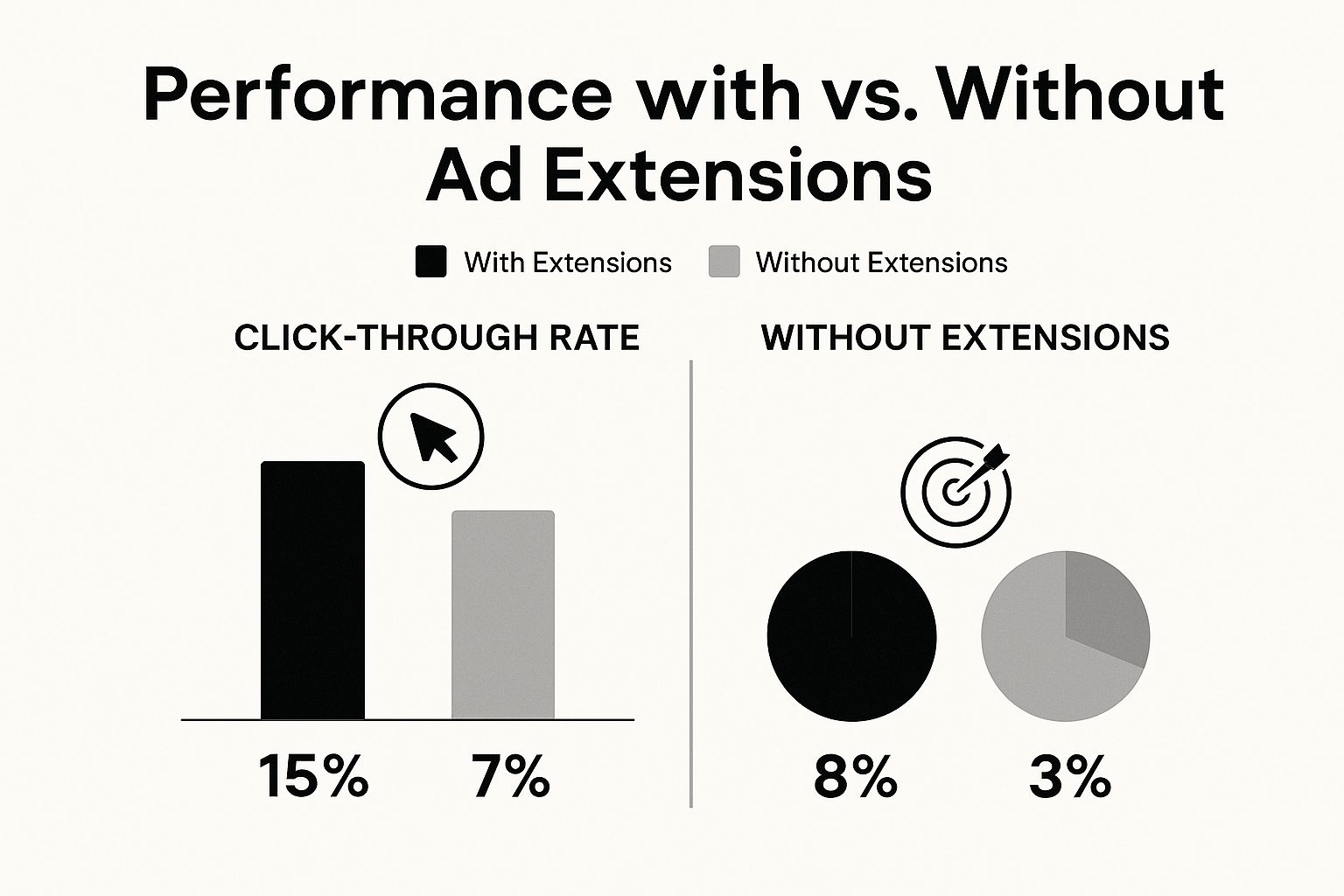
The data shows that a well-crafted ad with the right extensions can more than double click-through rates and nearly triple conversion rates. This is the difference between an ad that just sits there and an ad that actively generates business.
Of course, to stay ahead, you need the right tools for analysis, too. You can explore some of my favorite PPC competitor analysis tools to outsmart bloated agencies in another one of my guides.
Expert Strategy vs. Bloated Agency Management
This is where the rubber meets the road—and where you can spot the difference between a dedicated consultant and a bloated agency a mile away.
Big, overpriced agencies often treat your account like just another line item on a spreadsheet. Their standard playbook? Flip on automated extensions, maybe apply a generic template, and move on to the next client. It’s a paint-by-numbers approach that prioritizes their efficiency, not your results.
That isn't just lazy; it's leaving your money on the table. It completely misses the entire point of ad extensions, which is to create a powerful, cohesive ad that actually connects with someone.

The Consultant's Meticulous Approach
An expert consultant goes much, much deeper. Instead of just hitting "enable," a specialist meticulously digs into your unique business goals to hand-pick and customize the perfect mix of extensions.
This means writing unique, compelling copy for every single sitelink and callout—copy that lines up perfectly with the main ad headline and tells your brand's story. It's about making sure every piece of your ad works together in harmony to drive performance. That’s a level of detail you just won’t get from a junior account manager at a big firm who is juggling 50 other accounts.
When every extension is strategically chosen and written, your ad becomes more than just a block of text. It transforms into a highly relevant, information-rich tool that speaks directly to your ideal customer’s needs.
This focused expertise delivers a far greater return than paying for an agency’s massive overhead, multiple layers of account managers, and cookie-cutter reports. To really maximize efficiency, an expert strategy also involves automated creative testing to continuously fine-tune all ad elements, including those carefully crafted extensions.
The results of this tailored strategy are undeniable. A deep dive shows exactly how an expert consultant crushes agency CTRs in Google Ads, proving that specialized attention is what truly drives superior performance.
How to Implement Ad Extensions Like a Pro
Putting ad extensions to work isn’t just about flipping a switch in your Google Ads account. It’s a hands-on, strategic move that separates the pros from the amateurs. A bloated agency might just enable the automated defaults and call it a day, but an expert meticulously crafts each component to squeeze every drop of performance out of your budget.
Your first step is thinking about where to apply them. Broader extensions like callouts—think "Free Shipping" or "24/7 Support"—work great at the account or campaign level. But for something specific like a sitelink pointing to a product category, that needs to be at the ad group level. Why? Because you need it to be hyper-relevant to what the user actually searched for.
Beyond the Basics of Implementation
This is where the real work begins, and frankly, where a specialist’s touch gives you a massive edge over a standardized agency approach that often glosses over the details.
Here’s a quick checklist for doing it right:
Write Compelling Micro-Copy: Don't just use your page titles for sitelinks. That’s lazy. Use action-oriented language that gets people to click, like "Shop Our Summer Sale" or "Get a Free Quote Now."
Aim for a Mix of Four: You want to have at least four different extension types running in your campaigns. This gives Google's algorithm more tools in its toolbox to test and serve the best combination for each individual search auction.
Monitor Performance Relentlessly: Ad extensions are not a "set it and forget it" feature. You have to regularly dive into the "Assets" report in Google Ads to see what's actually driving clicks and—more importantly—conversions. Cut what isn't working and double down on what is.
By actively managing and refining your ad extensions, you stop guessing and start making informed, data-driven decisions. This is the hands-on optimization that turns a good campaign into a great one, ensuring you’re getting the most out of every dollar you spend instead of just paying for an agency’s overhead.
Common Questions About Ad Extensions
Even after you've got your head around the "what," the practical questions always start bubbling up. It's totally normal to wonder how these things really affect your budget and day-to-day results. Let's clear the air and tackle the most common sticking points with some straight answers.
Think of this as your go-to guide for squashing any last bit of uncertainty about how ad extensions work in the wild.
Do Ad Extensions Cost Extra Money?
Nope. Adding extensions to your ads is completely free. You only get charged your normal cost-per-click (CPC) when someone actually clicks on any part of your ad.
For example, if someone clicks one of your sitelinks, you pay the same CPC you would have if they'd clicked the main headline. Here's the kicker, though: extensions boost your Quality Score, which can actually lower your average CPC over time. You end up saving money and making your budget work harder.
How Many Ad Extensions Should I Use?
Google's official line is to use every single extension that makes sense for your business goals. As a bare minimum, a seasoned pro will make sure you have at least four different types running in your campaigns (think Sitelinks, Callouts, Structured Snippets, and a Location or Call extension).
Why the magic number? It gives Google’s algorithm enough material to work with. It can then test different combinations in every ad auction and serve the version most likely to win the click. It's like having a 24/7 optimization assistant working for you.
Will My Extensions Always Show Up?
Not every time. Google's algorithm ultimately makes the call based on your Ad Rank—a score calculated from your bid, your Quality Score, and the expected impact of your extensions.
To give your extensions the best shot at appearing, your ad needs a high Ad Rank. This is yet another reason why obsessing over ad quality and relevance isn't just a "nice to have," it's absolutely critical to getting the most out of your campaigns.
A higher Ad Rank means greater visibility for both your ad and its extensions, allowing you to dominate more space on the search results page and push competitors down.
Can I Just Use Automated Extensions?
You can, and this is exactly what most bloated, overpriced agencies fall back on. While automated extensions are an okay starting point if you have nothing else, it’s a passive approach that completely lacks strategic control. This route usually spits out generic, uninspired ad components that don't align with your specific offers or brand voice.
A dedicated consultant, on the other hand, will manually build and tailor each extension to perfectly match your ad copy, landing pages, and campaign goals. This custom, hands-on approach almost always demolishes the performance of generic automated ones. It’s a key difference between basic account management and expert-led optimization that actually delivers a return.
Stop paying for agency overhead and start investing in an expert strategy that gets results. At Come Together Media LLC, I provide the one-on-one Google Ads management your business deserves. Book your free, no-obligation consultation today and see what a difference a dedicated expert can make. Schedule your free consultation now.


Comments