

Most advertisers being pitched server side tagging don't need it yet. That's the part vendors skip.
Google first introduced server-side tagging publicly on August 12, 2020, when it announced that Tag Manager and Tag Manager 360 users could move many third-party tags out of the browser and into a server container hosted in their Google Cloud account, which Google said could improve page load times, data security, and data controls (Google announcement). Then on September 23, 2021, support expanded beyond Google Cloud-specific deployment to any provider running Docker, which made it much more practical for real businesses to adopt without hard infrastructure lock-in (PPC Land coverage).
I'm Chase McGowan. I run a small roster on purpose, and I spend most of my time fixing the stuff agencies love to talk around. Tracking is high on that list. If you're spending real money in Google Ads or Meta and your measurement is shaky, server side tagging can help. But if your fundamentals are still a mess, it's just a more expensive way to stay confused.
I've seen both sides. On one account, better tracking and account structure helped a premium ecommerce brand produce $6.65M more revenue on $119K less spend, with platform-reported ROAS moving from 13x to 33x over three years. On Meta for that same brand, platform-reported attributed revenue reached $3.87M on $134.8K spend, for a 28.7x blended ROAS. On another, an ophthalmology practice went from under 1% conversion rate to 17%+, with platform-reported cost per conversion down 89%, plus 190 additional patient calls per month. None of that happened because of a trendy setup alone. It happened because the measurement layer was treated like infrastructure, not decoration.
Table of Contents
- What Server Side Tagging Does
- Why Client-Side Tracking Broke
- How the Server Container Fits Into Your Stack
- Server Side vs Client Side Tagging
- Who Needs Server Side Tagging
- A Practical Migration Roadmap
- What Server Side Tagging Does Not Fix
- Common Post-Launch Failures and Next Steps
What Server Side Tagging Does
Server-side tagging is not an automatic fix for weak measurement. It changes where tracking data is processed, and that can improve control when browser-based collection loses signals. For the roughly 80% of advertisers with poor fundamentals or modest tracking needs, it adds cost and complexity without solving the core problem.
In plain English, server side tagging means your site stops sending tracking data directly from the visitor's browser to every platform. Instead, the site sends a smaller request to a server container you control. That server decides what to forward to Google Ads, GA4, Meta, and other endpoints. Google describes this as processing user activity on a server you control rather than in the user's browser, with rules applied before information is sent onward (Google server-side overview).
For a shorter explanation, read this guide to server side tracking for Google Ads success. The browser still collects some information. It carries less of the measurement workload.
What changes in practice
Google Tag Manager's architecture uses a web container to send HTTP requests to a server container hosted in a cloud environment. The server container processes those requests and forwards the required data to Google products or third-party endpoints (Google Tag Manager features).
That setup provides three practical benefits:
- Less code running in the browser. Fewer vendor scripts can reduce client-side work.
- More control over payloads. You can shape, normalize, or limit the data each platform receives.
- A controlled intermediary. Your site owns the endpoint between the browser and external vendors.
Those benefits matter when you have meaningful paid media spend, several destinations, and a team that can maintain the setup. They do not justify server-side tagging for every account.
Practical rule: If you cannot explain where conversion data is collected, transformed, and forwarded, fix that process before adopting server-side tagging.
As an operator, I care about usable conversion data, not an advanced-sounding stack. Server-side tagging can strengthen measurement when browsers drop signals. It also creates hosting, configuration, consent, and debugging responsibilities. More control helps only when someone owns those failure points.
Why Client-Side Tracking Broke
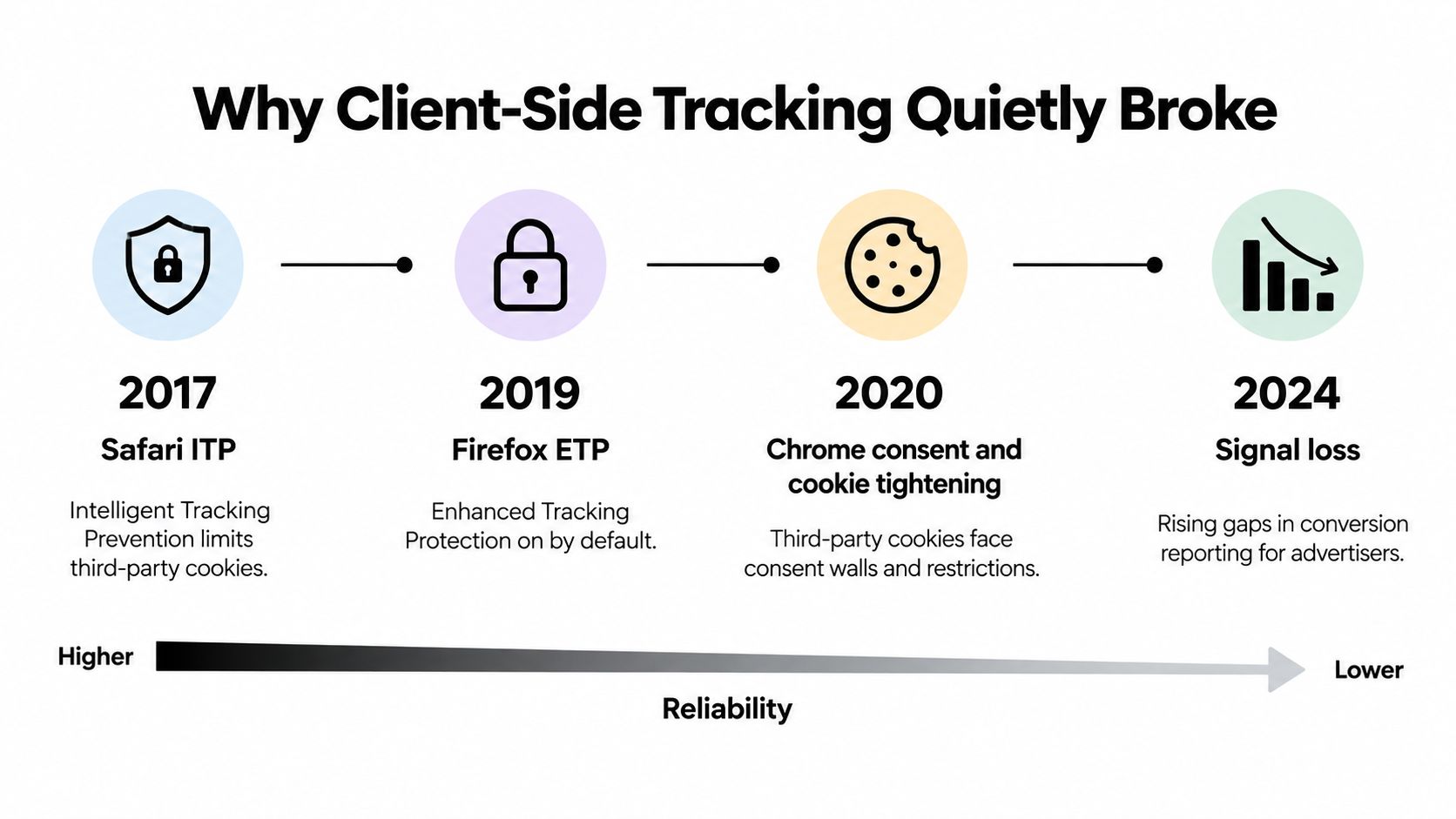
Client-side tracking did not fail overnight. Browser restrictions steadily reduced the reliability of scripts, cookies, and identifiers that advertisers had treated as dependable measurement infrastructure.
The timeline matters. Safari's Intelligent Tracking Prevention 2.0 arrived in June 2018, Firefox enabled Enhanced Tracking Protection in October 2018, and Safari's ITP 2.1 capped persistent JavaScript-written cookies at seven days on February 21, 2019 (browser privacy timeline and server-side GA milestone). Those changes made browser-executed measurement less consistent, especially for longer customer journeys.
The browser stopped being neutral
Advertisers once treated the browser like a simple delivery pipe. Add a script, fire a tag, count a conversion, and continue. Privacy controls ended that assumption.
Cookies became less durable, tracking behavior faced tighter restrictions, and JavaScript in the page became a less dependable measurement layer. The browser now filters what survives. That directly affects Google Ads Smart Bidding, Google's automated bidding system, because incomplete or missing conversion signals give its bidding models less usable input.
The operational problem is fragility, not a philosophical privacy debate. A conversion can still happen while the browser drops the identifier or blocks part of the event.
What changed for advertisers
- Longer attribution windows weakened because browser-set identifiers expired or disappeared sooner.
- Cross-domain and cross-session continuity suffered as client-side state became easier to strip.
- Optimization quality declined when advertising platforms received fewer complete events.
Paid media teams should build a first party data strategy instead of adding pixels and hoping the browser preserves every signal.
Server-side tagging addresses part of this measurement problem by moving selected processing away from the page. It does not restore every lost signal or remove consent requirements. For the majority of advertisers, fixing conversion definitions, consent handling, and account hygiene comes first. Server-side tagging earns its place when browser loss materially affects optimization and the business can maintain the added system.
How the Server Container Fits Into Your Stack
A server container is a control layer between your website and the platforms receiving measurement data. It does not replace the web container. It gives you a place to inspect, transform, restrict, and forward requests before vendors receive them.
The clearest analogy is a restaurant kitchen pass.
Your website is the dining room. A customer places an order, and the web container acts like the waiter who records it. The server container is the kitchen pass, where the ticket is checked, cleaned up, and sent to the right stations.

The actual request flow
Google's setup uses both a web container and a server container. The web container sends an HTTP request to your server endpoint. The server container receives that request, applies your rules, and forwards only the data each destination needs.
The flow is straightforward:
- A user acts on your site, such as viewing a page, submitting a lead form, purchasing, or clicking to call.
- The web container packages the event and sends it to the server endpoint.
- The server container interprets the request and decides what to retain, change, or block.
- Server-side tags forward the approved data to destinations such as GA4 or Google Ads.
The publisher's server sits between the browser and external vendors. That changes operational control because the data reaches your server before it is relayed to other platforms (Google server-side tagging consent documentation).
What a good setup usually includes
Set these foundations before building the server container:
- A clean event schema. Inconsistent event names and parameters produce inconsistent reporting. Server-side processing will not correct a weak measurement plan.
- Consent mode working upstream. Google documents that the web container collects the consent choice, the Google tag adds consent parameters to the request, and consent-aware server tags respond to those signals.
- Clear ownership. Someone must monitor endpoints, client configurations, destinations, failures, and costs as production infrastructure.
The server container should support a defined measurement plan, not compensate for missing planning. If the business cannot maintain event governance and consent controls, adding another container creates overhead without solving the underlying problem.
Use the architecture when it gives your paid media operation more control over request handling and vendor forwarding. Do not buy it because a vendor presents server-side tagging as a default upgrade.
Server Side vs Client Side Tagging
Business owners need the trade-offs, not a philosophy lecture. From an operator's seat, server-side tagging is a control and durability upgrade, not an automatic replacement for a working client-side setup.
The short version
Client-side tagging is simpler, cheaper, and easier for a small team to maintain. Server-side tagging moves more processing into a server container, which Google describes as a way to reduce browser-side work and give businesses more control over data handling (Google Tag Manager features), while its guidance covers when that added architecture makes sense (Google guidance on why and when to use server-side tagging).
Server Side vs Client Side Tagging Comparison
| Dimension | Client-Side Tagging | Server-Side Tagging |
|---|---|---|
| Data quality | More exposed to browser restrictions, blockers, and inconsistent execution | More resilient because the server processes and forwards event data |
| Speed | More third-party code runs in the browser | Less third-party processing happens on the page |
| Cookie handling | Browser behavior directly affects identifiers and persistence | More first-party control when deployed properly on your domain |
| Cost | Lower infrastructure burden | Added hosting, implementation, and maintenance overhead |
| Maintenance | Easier to launch and easier to neglect | Requires monitoring, QA, and governance |
| Control over data | Vendors often receive data directly from page scripts | You can shape and filter what gets forwarded |
The table points to the true trade-off. Server-side tagging can improve control, but it adds infrastructure that someone must own and maintain.
My recommendation
Do not approve a server-side build because a vendor calls it the modern default. Approve it when browser-side limitations, data routing requirements, or operational risk create a measurable business problem. If your current account has broken conversion actions or weak QA, fix those before adding another layer.
If you want an independent review before making the jump, a single 1:1 Office Hours session can pressure-test whether the setup is limiting performance or poorly configured.
Operator view: Server-side tagging is usually worth it when bad measurement is already costing you money. It is not worth it when your account still has basic tracking errors, weak conversion actions, or no disciplined QA process.
Who Needs Server Side Tagging
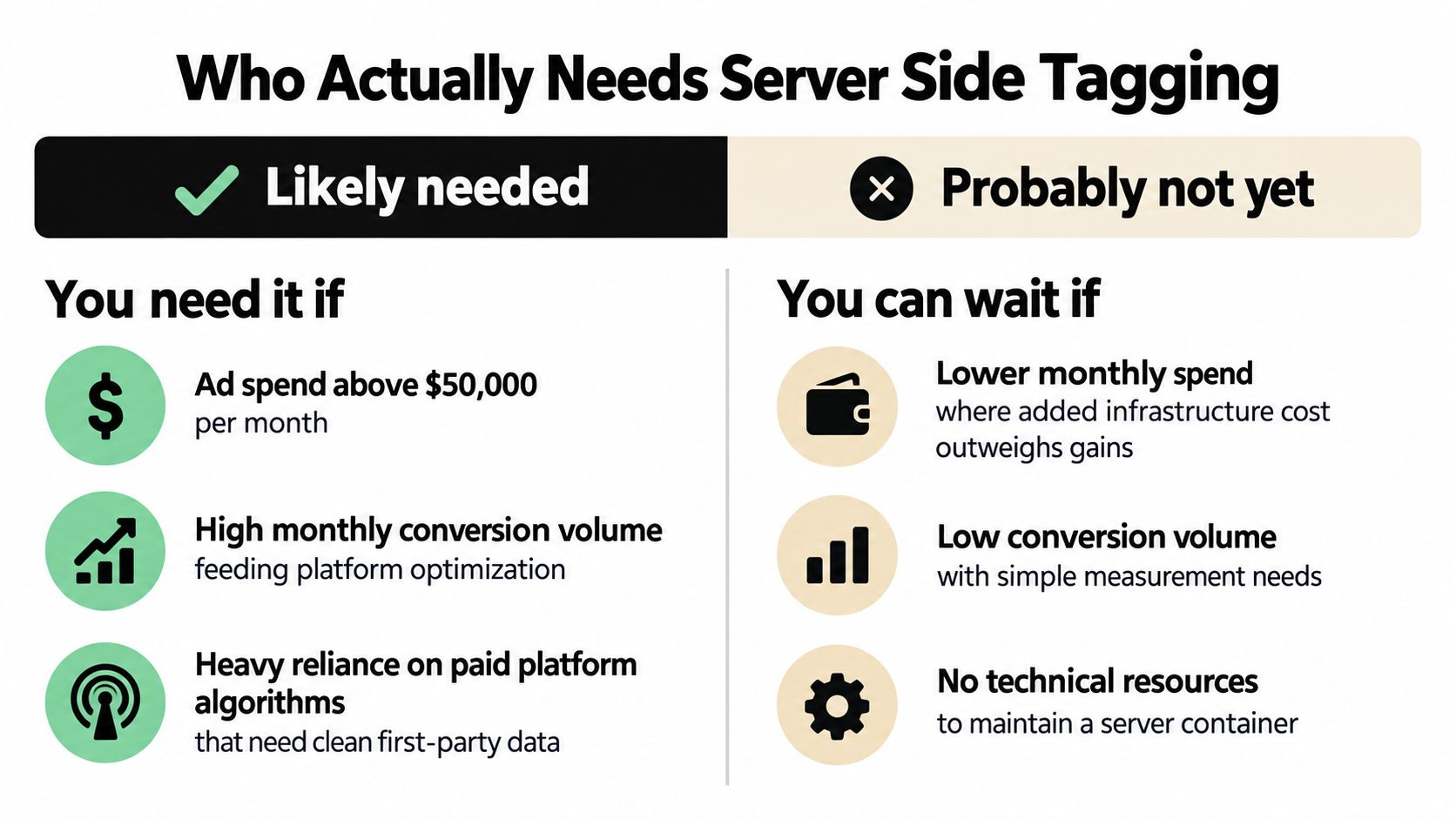
Server-side tagging is not the modern default. For roughly 80% of advertisers, it adds cost and maintenance without solving a business problem. Keep the browser setup lighter if it already gives Google Ads enough reliable signal to optimize profitably.
You probably need it
You are a strong candidate when several of these conditions apply:
- You spend more than $50,000 per month in Google Ads, and Smart Bidding depends on accurate conversion feedback.
- You rely heavily on iOS or Safari traffic, where browser-side measurement tends to be less durable.
- You use Google Ads, GA4, and Meta together and need cleaner event routing across platforms.
- Your site is already heavy, so reducing browser-side tag load would improve performance.
You probably don't
You can usually wait when these conditions describe your business:
- You spend under $10,000 per month on paid media.
- Your monthly conversion volume is low, so automated bidding receives limited signal.
- You do not have technical ownership for cloud infrastructure, event design, and QA.
- Your current problem is setup quality, not architecture.
A server container does not repair poor measurement. If conversion actions, consent handling, or event definitions are wrong in the browser, moving the same logic to a server only adds another place to maintain it.
Adoption is rising, maintenance is not
A 2026 tracking report found server-side tracking adoption at 17% in DACH, 10% in the EU, 8% in the UK, and 5% in the US (Tracking Report 2026.pdf)). Those figures show growing interest, not proof that every advertiser needs the setup.
The operational requirement is straightforward. Someone must own event design, QA, consent behavior, routing rules, and maintenance after launch. Teams without that ownership should review this guide to analytics engineering before approving the architecture.
For freelancers and agencies, the Freelancer Ops Pack Add-On is relevant because client PPC work creates process overhead beyond campaign management. Use it to assess whether your delivery process can support another technical system, not as a reason to buy one.
Approve server-side tagging when browser limitations or data-routing requirements create a measurable commercial problem. Otherwise, fix the existing tracking first and keep the stack simpler.
A Practical Migration Roadmap
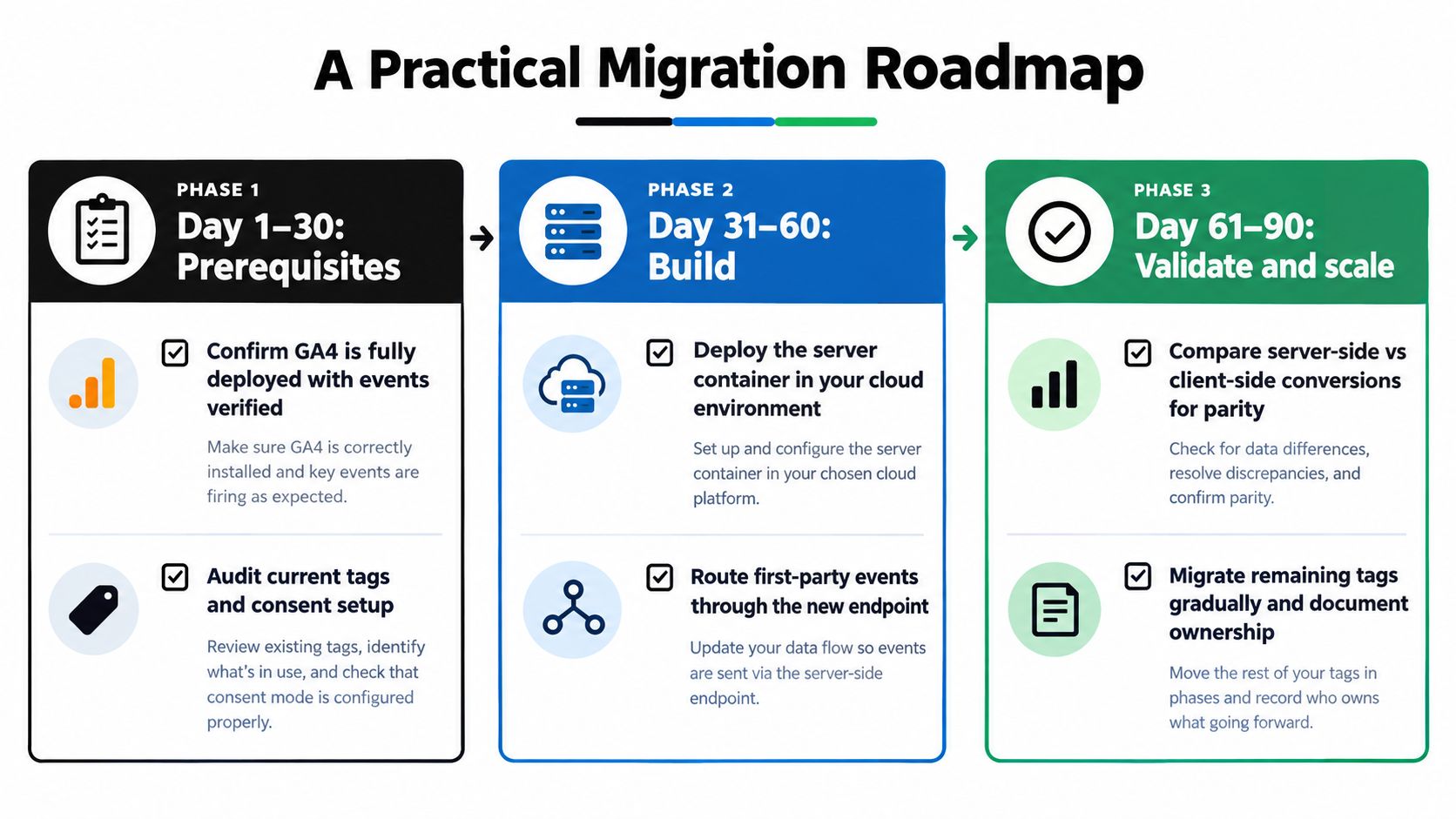
Start with measurement, not infrastructure. A server container preserves bad event definitions, broken consent logic, and unreliable conversion actions. Fix those before adding another layer to maintain.
Day 1 to 30
Build the baseline first.
- Confirm GA4 deployment. Core events should exist, fire consistently, and pass validation.
- Audit existing tag behavior. Record what fires, when it fires, and which parameters each tag sends.
- Verify consent mode. Document the consent states reaching the page and the behavior tied to each state.
- Check domain and implementation constraints. Google recommends same-origin serving for server-side tagging. The server and website can share a domain through a subdomain or path forwarding. The default domain does not receive server-set cookie benefits and can set only JavaScript cookies (Google custom-domain guidance).
Use this 2026 conversion tracking audit guide as the pre-migration checklist. Do not approve the architecture until the current setup has a documented baseline.
Day 31 to 60
Build the server layer in parallel. Keep the existing browser implementation active until the new path produces comparable data.
Docker support means you are not tied to one cloud vendor. Choose hosting based on where your team already runs infrastructure, how it handles deployment and monitoring, and who will own incidents.
During this phase:
- Stand up the server container in the selected cloud environment.
- Route web requests through the server endpoint using the correct web container configuration.
- Mirror critical events so browser-side and server-side collection can be compared.
- Validate parameter integrity before transferring conversion actions.
Do not migrate every tag at once. Start with the events tied directly to reporting or bidding, then confirm the server output before expanding the scope.
Day 61 to 90
Cut over only the tracking that earns its place.
- Move Google Ads conversion actions first when bidding depends on them.
- Deduplicate carefully so browser and server tags cannot count the same action separately.
- Monitor daily at first, checking conversion volume, parameters, consent behavior, and discrepancies.
- Write a runbook covering ownership, failure checks, rollback steps, and change history.
If no one owns post-launch QA, stop before migration. A server setup without operational ownership creates another tracking failure, not a better measurement system.
What Server Side Tagging Does Not Fix
Here is where most sales copy gets slippery.
Server side tagging is often framed as a privacy solution. It is not. It's a measurement and control solution. Consent and legal basis still matter.
A privacy guide published in 2025 notes that organizations still need valid consent, must explain server-side processing clearly, and should log consent lineage. Another 2026 source makes the same core point from a different angle: browser blockers and cookie limits create measurement losses, but those losses do not waive privacy obligations (Didomi guide on server-side tracking and consent management).
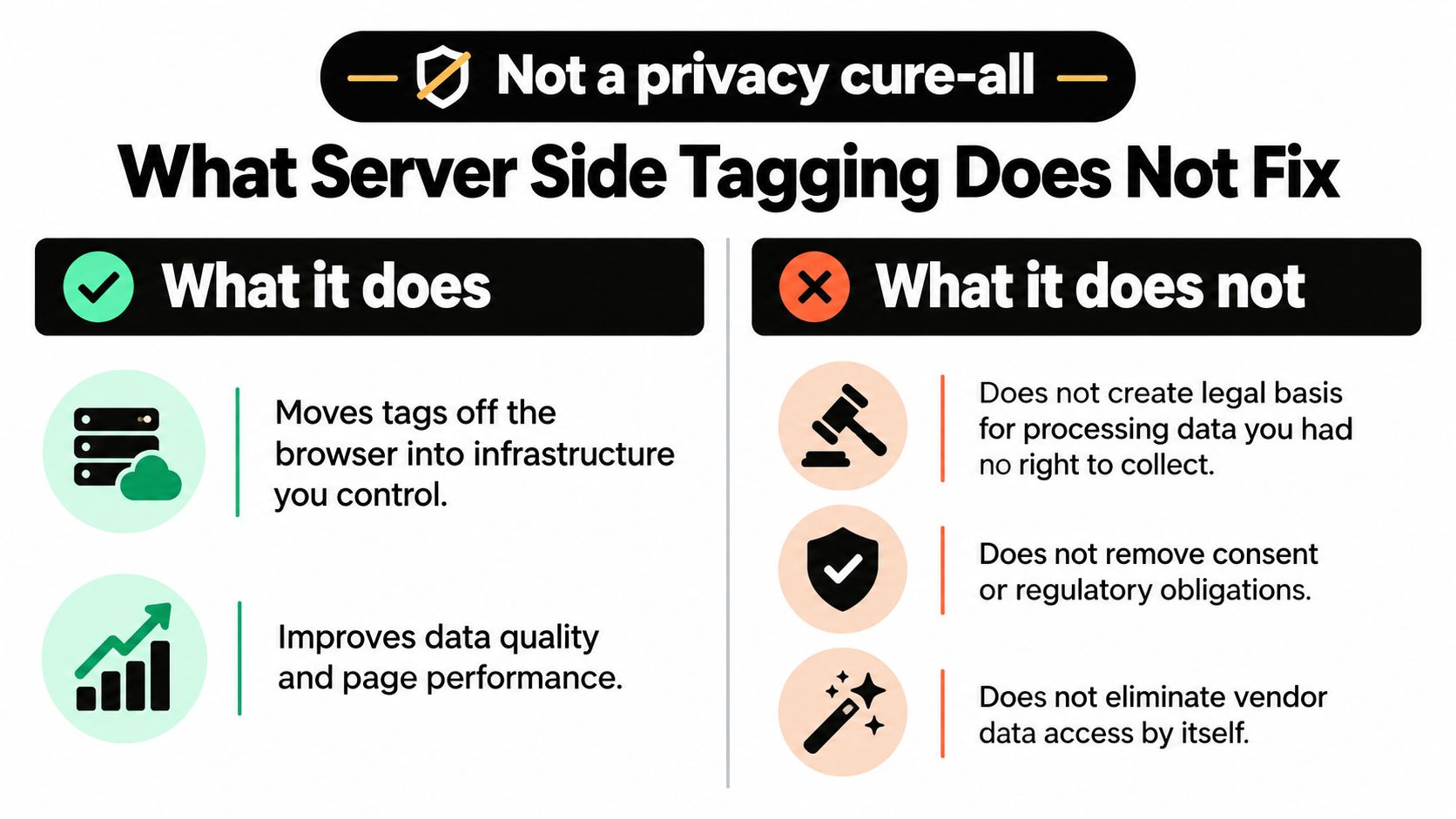
What it helps with
Server side tagging can help you:
- Reduce browser-side exposure
- Control payload shaping
- Improve first-party handling
- Limit direct third-party script dependence
What it doesn't solve
It does not solve:
- Consent collection
- Lawful basis
- Vendor contracts
- Retention policy
- Bad governance
It also doesn't magically make third-party data concerns disappear. If you need the plain-English framing on that topic, read Come Together Media LLC on third party.
Server side tagging can improve control. It does not give you permission you didn't already have.
Common Post-Launch Failures and Next Steps
Server-side tagging rarely breaks at launch. It breaks later, after the team stops checking it and assumes the migration is finished.
The failures I see most
- The web container routes incorrectly. Platform volume drops or stays flat after cutover. Verify that web tags send requests to the server endpoint.
- Conversions fire twice. Google Ads or Meta reports inflated results. Remove old browser conversion tags or add clear deduplication logic.
- Consent states do not carry through. Tags fire against user choices. Confirm that the web container passes consent signals and that server-side logic respects them.
- Identifiers disappear in transit. Match quality and attribution continuity weaken. Compare incoming requests with outgoing payloads to find dropped parameters.
- No one owns infrastructure monitoring. Problems remain invisible until bidding performance declines. Assign one owner and schedule recurring checks.
What to check today
Open the setup and confirm:
- One primary source of truth for conversion actions
- Clear deduplication logic
- Documented consent mode behavior
- A human owner for quarterly cleanup
- Cross-domain rules understood before rollout
Google's support documentation sets a requirement that often gets missed. To connect interactions across different domains, both domains must use server-side tagging, and both must use the same Google Tag Manager account and container (Google Tag Manager support on cross-domain server-side tagging). If your planned journey does not meet that requirement, redesign it before deployment.
Use the audit checklists I use to create a repeatable QA routine after launch. A checklist only helps when someone owns it, runs it, and records the result.
If enhanced conversions, consent mode, or server-side tagging need implementation by a paid media operator, I handle that through the $7,500 30-day Google Ads Sprint. Hire me for 30 days before you hire me indefinitely. If you only need an opinion on whether server-side tagging belongs in your stack, book the $350 Office Hours session through Office Hours.
I run Come Together Media LLC as a one-operator PPC consultancy. Before changing bids or budgets, I check the measurement layer, including GA4, Google Tag Manager, consent mode, enhanced conversions, and server-side tagging where it fits. If your tracking is unreliable, start with the Sprint or Office Hours, and I will tell you plainly whether you need this setup.