Unlock Revenue with Google Analytics Goals Your Agency Ignores
- Chase McGowan
- 1 hour ago
- 16 min read
Let's be blunt: if your Google Ads campaigns are running on generic, out-of-the-box Google Analytics goals, you are almost certainly lighting money on fire. So many businesses I see are still tracking vanity metrics like ‘time on page’ or ‘pages per session’ as actual conversions. This paints a pretty picture in your reports but absolutely drains your ad budget on the wrong clicks.
Real growth comes from tracking the actions that actually put money in your pocket. As a dedicated Google Ads consultant, my entire focus is on finding those actions for your specific business—a level of detail you simply won't get from an overpriced, bloated agency.
Why Your Agency's Goals Are Leaking Money

The single biggest mistake I find when auditing new accounts is a deep misunderstanding of what a "goal" should even be. The problem is made ten times worse by big, impersonal agencies that just slap the same tired, templated tracking setup on every client, no matter their business model. Their goal is to get you set up quickly, not correctly.
I’ve seen this exact mistake create a complete reporting nightmare time and time again. The dashboard is green, the "conversion" count is way up, but sales are dead flat. This is what happens when your ad spend is optimized for user behaviors that don't actually lead to new customers or revenue. It’s a classic case of looking busy but going nowhere fast, a hallmark of agency mismanagement.
From Vague Goals to Tangible Conversions
The game completely changed with the switch from Universal Analytics (UA) to Google Analytics 4 (GA4). The old "Goals" system was often rigid and clunky. GA4, on the other hand, is built on a much more powerful and flexible event-based model.
This isn't just swapping the word 'Goals' for 'Conversions'—it's a total philosophical shift. Now, practically any user interaction can be tracked as a unique event. This gives you an incredible amount of detail, but it also brings a new layer of complexity.
This is where you see the stark difference between a bloated agency and a dedicated specialist. An agency might set up a few basic events and call it a day. As an expert consultant, I dig deep to figure out which specific actions signal real purchase intent for your business.
A properly configured GA4 conversion isn't just a data point. It's a direct signal telling Google Ads, "Find me more people who do this specific thing." Optimizing for the wrong signal is like giving a delivery driver the wrong address. You’ll spend a lot of gas and never get the package where it needs to go.
The Specialist Advantage in Goal Setting
Working with a specialist means getting a strategy built for you, not a generic checklist from a junior account manager. I go beyond the obvious to identify and track the micro-conversions that happen right before a sale.
Here’s what that looks like in the real world:
For an e-commerce store: We don't just track 'purchase'. We might track events like 'newsletter_signup_from_product_page' or 'viewed_specific_category_3_times' to build incredibly powerful remarketing audiences.
For a B2B service: Instead of just a 'contact_form_submit', we create events for 'downloaded_case_study' or 'watched_testimonial_video_75_percent'.
These granular events feed Google Ads the rich data it needs to make profitable decisions. It’s about building a data-driven blueprint for your success, not just plugging your account into an agency's assembly line. That individual attention is my key advantage.
The right Google Analytics goals—now conversions—aren't just for tracking. They are for actively steering your ad campaigns toward your most valuable customers.
The Agency Assembly Line vs. The Consultant's Blueprint
Big agencies often run on a templated, one-size-fits-all model. I call it the assembly line: your business comes in one end, gets the same five generic Google Analytics goals bolted on, and gets pushed out the other.
It doesn't matter if you're selling custom furniture or generating leads for a medical practice; you're getting the same setup. This approach is efficient for the agency, but it can be disastrous for your budget. It’s a system designed for their internal scalability, not your profitability.
Your account becomes just another number, managed by a junior rep following a tired checklist that fundamentally ignores what makes your customer journey unique. I am the opposite—I am your dedicated partner, building a strategy from the ground up.
The Problem With One-Size-Fits-All Goals
Let me give you a real-world example. I recently took over an e-commerce account spending a significant amount on Google Ads. Their previous "award-winning" agency had them optimizing for ‘Add to Cart’ events.
On the surface, the reports looked fantastic. The ‘conversion’ numbers were huge, and the cost-per-conversion was impressively low.
But there was a massive disconnect: their revenue was completely flat.
Why? Because optimizing for an ‘Add to Cart’ is a classic vanity metric. It feels like progress, but it doesn't actually put money in the bank. It tells Google Ads to find people who like to browse and click, not people who actually buy. We were burning their budget attracting window shoppers instead of paying customers—a critical error I see far too often from large, unfocused agencies.
The goal of a Google Ads campaign isn't just to get cheap conversions; it's to acquire profitable customers. When your Google Analytics goals are misaligned with your business's actual revenue drivers, you're just paying for clicks that go nowhere.
Crafting a Custom Blueprint For Profitability
This is where my blueprint as a consultant comes in. Instead of applying a template, my first step is always a deep dive into the specifics of your business. I don't just ask what you sell; I want to understand your margins, customer lifetime value, and the real signals of high purchase intent.
With that e-commerce client, the fix was straightforward but required a specialist's touch. We immediately shifted the primary conversion action in Google Ads from ‘Add to Cart’ to the actual ‘Purchase’ event, complete with dynamic transaction values.
This small change had a massive impact. It sent a completely different signal to Google's algorithm. Instead of "find me people who add things to their cart," the new instruction was "find me people who spend money, and here is exactly how much they spend."
We then took it a step further. We set up secondary conversion goals for high-intent actions, like newsletter sign-ups that happened on product pages. These don't bring in immediate revenue, but they're strong indicators of a future customer. They help inform the algorithm without distracting it from the main goal: driving sales.
The results speak for themselves. By reallocating their budget based on this new, intelligent data, we increased their Return On Ad Spend (ROAS) by over 30% in the first 60 days. Their overall 'conversion' count went down, but their revenue went way up.
This strategic shift is precisely the kind of personalized work you won't get from an agency assembly line. For those interested in moving past ineffective agency models, you can learn more about a modern demand generation strategy that focuses on results. This level of detailed analysis and one-on-one strategy ensures your ad spend works smarter, not just harder.
A Practical Guide to Setting Up GA4 Conversions That Matter
Alright, let's get our hands dirty. Moving from theory to action with GA4 conversions—what we used to call Google Analytics goals—is less about being a technical wizard and more about thinking like a strategist. This is where an experienced consultant’s approach really separates itself from the cookie-cutter methods of a big, impersonal agency.
An agency might just flip a few switches on default events and call it a day. My process is different. We build a measurement plan that mirrors your business, ensuring every single conversion we track is a real signal of growth. We’re not just hoarding data; we're building a feedback loop that makes your Google Ads campaigns smarter and more profitable with every click.
This focus on what actually moves the needle is critical, especially with GA4 now being the standard. A massive 51.04% of the top 1 million websites are already on Google Analytics, and the full switch to GA4 is happening fast.
Creating Custom Events With Google Tag Manager
The real power move for tracking what matters is creating custom events using Google Tag Manager (GTM). This tool is your secret weapon for deploying tracking on specific user actions without having to constantly ping a developer for code changes.
Think of GTM as your command center for website tracking. You set up "triggers" (like a button click or a form submission) and connect them to "tags" (the little snippets of code that send the data to GA4). This gives you incredible flexibility.
For instance, instead of a vague "form_submit" event that lumps everything together, we can get surgical and create events like these:
high_value_lead_form: Tracks submissions only from your most important "Request a Consultation" form.
whitepaper_download_ppc: Fires when someone grabs a specific whitepaper, but only if they came from a paid ad campaign.
clicked_call_button_service_page: Captures clicks on your phone number, but only on your high-intent service pages.
This is the kind of detail that big agencies often skip because it takes time and a custom approach. But it’s exactly this granularity that lets us tell Google Ads, "Don't just find me any leads; find me leads that look exactly like this."
The process flow below shows how we shift from that generic factory model to a strategic, growth-oriented blueprint.
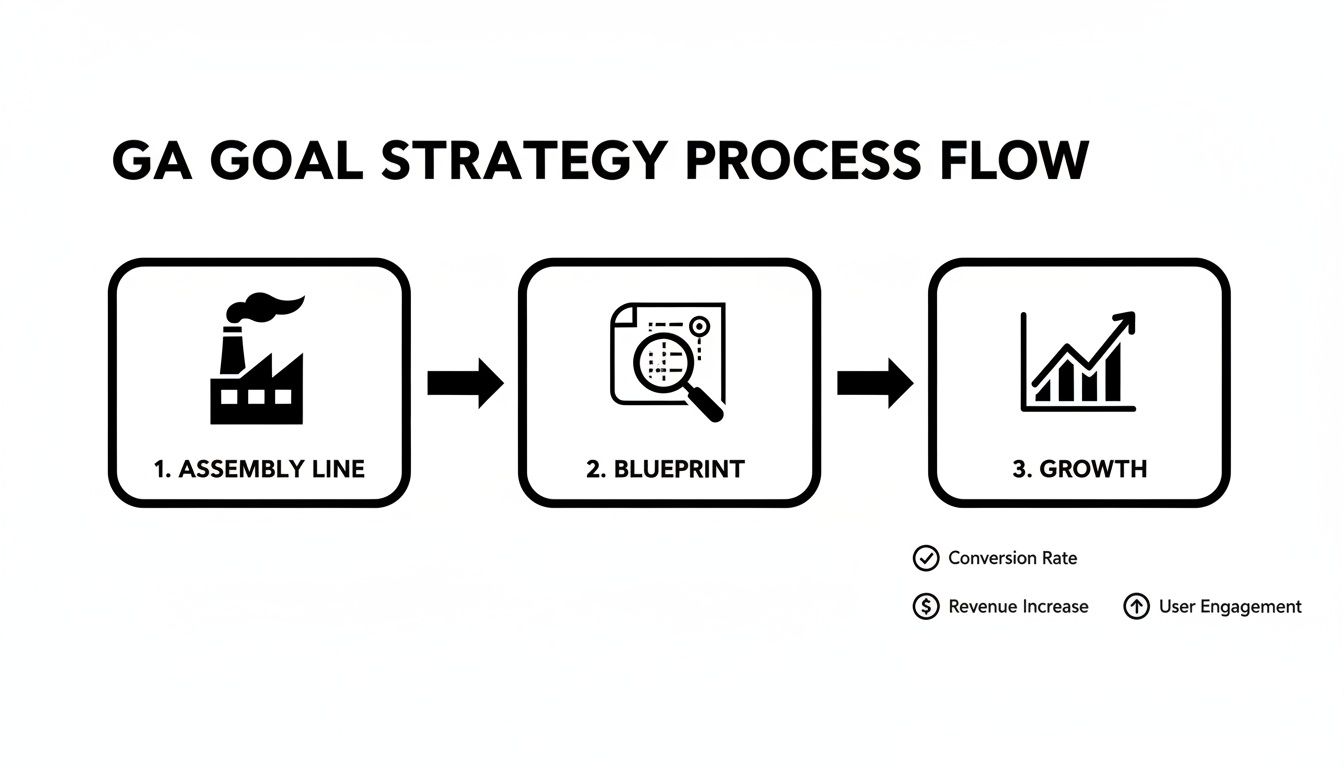
This visual nails it: we're moving away from a one-size-fits-all "Assembly Line" setup to a meticulous "Blueprint" strategy. It's the only way to get real, predictable growth.
Marking Events as Conversions in GA4
Once your custom event is set up and firing correctly in GTM (we’ll get to testing later), the next move is to officially tell GA4 that this event is a big deal. You have to mark it as a conversion.
This is a simple but non-negotiable step inside the GA4 interface. By flagging an event like as a conversion, you’re elevating it from just another data point to a core business KPI. It’s now on the scoreboard.
You'll navigate to the Admin > Data display > Events section. Find your custom event in the list and just flip the "Mark as conversion" toggle. That's it. Now it's an official conversion action that will show up in your key reports and be available for Google Ads.
Expert Tip: Don't go crazy and mark everything as a conversion. I’ve audited so many agency accounts where meaningless actions like PDF views or simple button clicks are tracked as conversions. This pollutes your data, confuses the Google Ads algorithm, and makes it impossible to optimize effectively. Be ruthless. Focus only on the events that represent genuine business value.
The Crucial Step: Assigning a Conversion Value
Here it is. This is the one thing that 90% of the agency-managed accounts I audit get wrong: assigning a value to your conversions. If you treat every lead as equal, you can't optimize for profit. Period.
Even if you aren't an e-commerce store with real-time transaction prices, you absolutely can—and should—assign a static value to your lead-gen goals.
So, how do we figure out that value? It’s just some simple business math:
First, what's your average lead-to-customer rate? Let's say 1 in 10 leads becomes a paying customer.
Next, what's the average lifetime value (LTV) of a new customer? Let's use $2,000.
Now, calculate your value per lead: $2,000 LTV / 10 leads = a $200 value per lead.
By passing this $200 value back to GA4 and Google Ads with every conversion, you unlock incredibly powerful bidding strategies like Target ROAS (Return On Ad Spend). You're no longer just telling Google to get you leads; you're telling it to get you revenue.
To make sure all this data is clean and actionable, you also need a solid grip on campaign tagging. Properly using tools like UTM for Google Analytics is foundational. This is the difference between just "running ads" and building a predictable growth engine for your business.
Proven Conversion Templates For E-commerce And Lead Gen
Let's get one thing straight: not all conversions are created equal. This is a fundamental truth that many agencies, especially the big, bloated ones, conveniently ignore. They'll apply the same generic tracking template to every account, whether you're a local retailer or a global B2B software company.
Your tracking needs to be as unique as your business model. The key is moving past the obvious. Sure, you'll track purchases and form fills. But the real, game-changing insights—the kind that give you a genuine edge—come from tracking the high-intent actions that signal someone is about to convert. That's where a specialist's touch makes all the difference.
Instead of a one-size-fits-all approach, I build a custom measurement blueprint for every client, refined from years of managing high-spend accounts. What follows isn't a rigid template, but a starting point rooted in real-world strategy. It’s about tracking actions that actually drive revenue, not just vanity metrics.
High-Value Goals For E-commerce
For any e-commerce brand, the event is king. No arguments there. But stopping at the final transaction means you’re leaving a goldmine of data on the table. We need to identify and track the micro-conversions that build powerful audiences and supercharge your ad strategy.
Here are a few battle-tested e-commerce goals I implement for my clients:
Newsletter Sign-up on Product Pages: When someone subscribes to your list from a product page, they're not just a casual browser. They're a red-hot lead signaling strong product interest.
Add to Wishlist: This is the classic "I want this later" signal. Building an audience of these users is remarketing gold, especially when that product goes on sale.
Viewed Specific High-Margin Category: Why spend your ad budget remarketing to everyone? Tracking users who view your most profitable product categories lets you focus your spend where it will have the biggest impact on your bottom line.
These goals help you map the entire customer journey, not just the last click. If you want to dive deeper into structuring these insights, our guide on actionable analytics report example templates for 2025 offers some excellent frameworks.
A big agency might celebrate a high "Add to Cart" rate. As your consultant, I focus on the revenue generated from users who clicked "Add to Wishlist" and later purchased during a flash sale. One is a vanity metric; the other is a profitable strategy.
Smart Conversion Goals For Lead Generation
Lead gen businesses live and die by the quality of their leads. A generic event is practically useless because it treats a "download our free checklist" submission the same as a "request a quote" submission. Differentiating between them is my job.
We need to set up goals that isolate your most valuable prospects. This requires a much more granular approach than most agencies are willing to take.
Consider setting up these specific conversion events:
High-Value Demo Request: Create a unique event that only fires when your main "Request a Demo" or "Get a Quote" form is submitted. This is your money-maker—assign a real monetary value to it based on your close rate and customer LTV.
Testimonial Video View: Track users who watch more than 75% of a client testimonial video. This behavior shows they are actively evaluating your credibility and are much further down the funnel.
Pricing Page Dwell Time: Set up an event that fires when a user spends more than 60 seconds on your pricing page. This is a massive signal of a user doing serious research and comparing options.
And don't forget about offline actions. Integrating a click-to-call feature for instant conversions can capture high-intent leads that might never fill out a form. Each of these custom Google Analytics goals sends a clean, unambiguous signal to Google Ads, telling the algorithm precisely what kind of customer you're looking for. This is how you stop wasting money on low-quality leads and start paying for conversations that turn into revenue.
Goal Setup E-commerce vs Lead Generation
To really drive the point home, here’s a quick comparison of how tracking priorities differ based on your business model. Notice how the "why" changes completely.
Tracking Priority | E-commerce Goal Example | Lead Generation Goal Example | Why It Matters |
|---|---|---|---|
Primary Conversion | event with dynamic value | with static value | Measures direct revenue vs. potential revenue. |
High-Intent Action | Signals future purchase intent vs. active evaluation. | ||
Audience Building | Segments users for profitable remarketing vs. lead nurturing. | ||
Top of Funnel | Captures product-specific interest vs. educational interest. |
As you can see, the goals themselves are just the start. The real strategy lies in understanding what each action represents and how you can use that data to find more of your best customers.
Linking GA4 To Google Ads For Maximum ROI

Getting your Google Analytics goals set up is a great first step, but it's just that—a first step. The real magic happens when you properly link your GA4 property to your Google Ads account. This is where the data starts to work for you, turning ad spend into predictable profit and allowing you to optimize campaigns for actual business results, not just vanity metrics like clicks.
A lot of agencies will perform the basic link, tick a box on their setup checklist, and move on. As a specialist, I know this is where the most important strategic decisions are made. It's the difference between telling Google Ads to "get me some traffic" versus "find me more customers who are actually worth at least $200 each."
The Power Of Importing GA4 Conversions
Once GA4 and Google Ads are talking to each other, you have to manually import your conversion events from Analytics into Ads. This simple action is what makes all our previous work pay off. It feeds your Google Ads account with the specific, high-value goal data we just configured, turning your or events into actionable targets for your campaigns.
This isn’t just for cleaner reporting. When you import these conversions, you're directly feeding the machine learning algorithms that drive Google's automated bidding. By giving strategies like Target CPA and Target ROAS clean, value-driven data, you empower them to find users who are most likely to complete the actions that actually grow your bottom line.
A Costly Mistake I See Every Month
Let me tell you a quick story. I recently audited an account for a new client spending over $20,000 per month. They had a big, well-known agency managing their campaigns, and on the surface, things looked okay. But their growth had stalled, and their cost-per-acquisition (CPA) was slowly creeping up.
When I dug in, I found a fatal flaw their agency had missed for over a year. While they had some decent goals set up in GA4, they never imported them correctly into Google Ads. Worse yet, they left the default, low-value goals as the primary optimization targets. Google's powerful AI was being told to optimize for all the wrong things—like simple page views and low-intent clicks.
This one oversight was costing them thousands. The agency was so focused on their templated processes and juggling dozens of accounts that they missed the most fundamental part of connecting analytics to ad performance. It’s the kind of subtle but devastating error that happens when you don't have a specialist's eyes on your account.
We fixed it. We paused the useless "goals," imported the high-value GA4 conversions, and reconfigured the account's primary conversion actions. Within 60 days, their CPA dropped by 22%. That’s the direct impact of expert oversight versus an agency's assembly-line approach.
Primary vs. Secondary Actions: What Your Agency Won't Explain
When you import conversions from GA4, Google Ads makes you classify each one as either a Primary or Secondary action. This is not some trivial setting; it’s a direct command to the bidding algorithm. Getting this wrong will cripple your campaign performance.
Primary Actions: These are the big ones. The conversions you want the algorithm to actively optimize for. They get included in the 'Conversions' column and directly influence automated bidding. Your or events should absolutely be Primary.
Secondary Actions: Think of these as valuable actions you want to observe but not have the algorithm chase directly. They're perfect for building audiences and adding context. Things like a or are great Secondary goals.
Large agencies often make the mistake of setting way too many actions as Primary. This just confuses the algorithm by giving it conflicting signals. A specialist knows to be ruthless here, focusing the AI on the one or two key goals that represent real revenue. For a deeper look at common setup errors, you might find our guide on how to fix your Google Ads conversion tracking helpful. This is the kind of insight that prevents costly mistakes and ensures every dollar of ad spend is working towards your most important business goals.
Your Google Analytics Goals Questions, Answered
After walking countless business owners and marketing managers through their analytics, I see the same questions pop up time and time again. These aren't just technical glitches; they're the real-world roadblocks that keep a good ad account from becoming a great one.
Here are my direct answers, framed from the perspective of a consultant who is focused on your profitability, not just hitting an agency’s reporting quota. This is where working one-on-one with a specialist makes all the difference. An agency might just send you a link to a generic help doc. My job is to give you a strategic answer that applies specifically to your business.
How Many Conversions Should I Track?
This is a classic. The short answer? As few as possible, but as many as are necessary.
A bloated agency will often set up a dozen "conversions" to make their reports look impressive. This is a critical mistake. It pollutes your data and completely confuses Google's bidding algorithms, which are trying to find you more of your best customers.
My philosophy is to be ruthless. We identify the one or two most important Primary conversion actions that directly translate to revenue—like a purchase or a high-value lead form submission. Then, we can layer in a few Secondary actions, like a newsletter signup or a case study download, to observe user behavior without diluting the main optimization goal.
It’s about quality, not quantity. One perfectly configured goal with dynamic value tracking is worth more than twenty vague, low-intent "conversions" combined. The point isn't to track everything; it's to track what matters.
Why Aren't My Goals Showing Up in Google Ads?
This is a frequent and incredibly frustrating technical hiccup. I’ve seen clients go for months with this problem, burning ad spend while their agency is MIA. It usually boils down to two main culprits:
The Link is Missing or Broken: The initial connection between your GA4 property and your Google Ads account was either never completed or has lost its permissions. This is a quick check in the Admin settings of both platforms.
You Haven't Imported Them: Linking the accounts isn't the final step. You have to manually go into Google Ads (Tools & Settings > Conversions) and explicitly import the specific GA4 events you want to use for bidding. It’s a step that is shockingly easy to miss.
An agency might take days to get back to you on a support ticket for this. As a dedicated consultant, this is the kind of critical-path issue I spot and fix immediately during an audit. It’s the difference between a partnership and a ticket number.
Can I Set Goals for Offline Sales?
Absolutely, and you absolutely should. This is an advanced tactic that separates the specialists from the generalists. Many businesses, especially in B2B or high-ticket e-commerce, close deals over the phone or in person days, or even weeks, after the initial online lead came in.
We can use a feature called Offline Conversion Import. Here’s how it works:
When a lead comes through your website, a unique identifier (GCLID) is captured with their information.
Your CRM system tracks that lead through your sales process.
When the deal closes, you upload a simple file to Google Ads containing that GCLID and the final sale value.
This closes the loop. It tells Google Ads exactly which keywords, ads, and campaigns produced actual revenue, not just leads. It’s a game-changer for measuring true ROI, and it’s a level of detail most overworked agencies simply don’t have the bandwidth to implement. They’re structured for volume, not for the detailed, surgical work that drives real profit.
Ready to stop guessing and start measuring what truly matters? Come Together Media LLC offers a personalized approach to Google Ads that big agencies can't match. Get a free, no-commitment consultation today and see how a specialist can fix your tracking and maximize your ROI.