


You're probably in one of two situations right now.
Either you're spending serious money on Google Ads and getting reports that look polished but don't answer the only question that matters, which campaigns are producing revenue. Or you've inherited an account where conversion tracking “exists,” but nobody can explain exactly what's being counted, when it fires, or whether the data lines up with your CRM.
I audit accounts like this all the time. The pattern is painfully consistent. Bloated agencies obsess over dashboards, then gloss over measurement. They'll talk about clicks, impressions, branded traffic, and blended lead volume while the account optimizes toward junk actions, duplicate conversions, or half-broken tags. That's not management. That's drift.
If you want to know how to set up google ads conversion tracking properly, start with this principle: tracking is not a technical afterthought. It is the control system for budget allocation, bidding, reporting, and scaling. Get it right, and Google's automation has clean signals. Get it wrong, and you train the platform to chase noise.
Stop Guessing and Start Measuring What Matters
You log into Google Ads after another month of spend. The dashboard says leads are coming in at an acceptable CPA. Sales says half of them are junk. Finance wants to know what ad spend turned into revenue. Nobody has a clean answer.
That is what bad conversion tracking looks like in practice. It does not fail loudly. It hides behind tidy reports while budget gets pushed toward actions that look productive and produce very little.

Google introduced conversion tracking in 2005 and turned paid search from a traffic-buying channel into a measurable acquisition channel. That shift still gets missed. Plenty of advertisers have tags installed, but they are still measuring the wrong events, counting duplicates, or stopping at a thank you page instead of tying ad clicks to revenue. Google's setup guidance makes the technical path clear in its conversion tracking documentation. The strategic part is where weak account management falls apart.
What weak setups actually measure
The problem is not a lack of data. It is bad judgment about which data should guide spend.
In sloppy accounts, conversion actions often include soft signals that should never steer bidding on their own:
Low-intent engagement events: Page views, scroll depth, or generic button clicks that show curiosity, not buying intent.
Shallow lead events: Form submissions tracked as wins with no check on whether the lead was qualified, contacted, or closed.
Default settings with no business logic: Count rules, values, and attribution choices left untouched, even when they distort performance.
No revenue accountability: Campaigns get credit for volume, while nobody verifies whether those conversions became pipeline or sales.
Use one standard. If an action would not justify higher budget, it should not sit at the center of your bidding strategy.
That one decision affects everything else, including bidding, reporting, landing page testing, and optimizing your revenue-driven sales path.
What clean tracking changes
Good conversion tracking gives Google a clearer signal. More important, it gives you a stricter operating model.
You can separate campaigns that create revenue from campaigns that create administrative noise. You can spot inflated lead counts before they poison Smart Bidding. You can compare CPA against actual sales outcomes instead of congratulating yourself for cheap form fills that never close.
The business outcome is the conversion that matters.
If you want a straightforward explanation of how measurement proves ad performance, this explanation of conversion tracking and ad ROI covers the basics well.
Clicks show activity. Qualified conversions show signal. Revenue decides whether the account deserves more budget.
The Foundation Your Agency Probably Got Wrong
A lot of wasted ad spend starts before a single tag is installed.
The problem is not usually Google Tag Manager, GA4, or the developer. It is the conversion action setup inside Google Ads. I see accounts every month with tracking that technically works and still produces bad decisions because the action was defined with no business logic behind it. Smart Bidding cannot rescue a weak signal. It just chases it faster.
Start in Goals > Conversions and build the action like it will control budget, because it will. You are choosing what Google should learn from, what reports will celebrate, and what your team will call success. If that definition is sloppy, CPA, ROAS, and budget allocation all get distorted from day one. If your broader measurement setup is messy, this guide to adding Google Analytics correctly and stopping wasted ad spend is a useful companion.
Name the conversion like it affects money
“Lead” tells you nothing. “Submit” tells you even less.
Use names tied to the actual business event so nobody has to guess what happened in the report:
Contact Form Submission
Consultation Request
Checkout Completed
Demo Booked
Quote Request
Phone Call From Landing Page
Clear naming does more than tidy up reporting. It keeps sales, marketing, and leadership aligned on what the account is producing.
Count setting changes bidding behavior
This setting is not administrative. It shapes the signal Google uses to optimize.
For lead generation, use One in most cases. Repeated form submits after one ad click rarely represent new pipeline. Counting all of them inflates conversion volume and teaches bidding to chase duplicate actions.
For e-commerce, use Every. Separate purchases produce separate revenue, and your tracking should reflect that.
Too many agencies leave this untouched because the tag fires and the dashboard looks active. Active is not accurate.
Set values based on revenue logic
If the action has commercial value, assign one. Zero-value conversions make value-based bidding weaker and ROAS reporting less useful.
Use simple value rules that match the sales model:
Business model |
Recommended value setup |
Why |
|---|---|---|
Lead gen with stable lead quality |
Fixed value |
Keeps optimization tied to average lead worth |
Lead gen with meaningful lead tiers |
Different values by action |
Helps Google favor stronger opportunities |
E-commerce |
Dynamic transaction value |
Reflects actual revenue |
Appointment-based business |
Fixed value until CRM loop is in place |
Gives bidding a usable value signal now |
A fixed value is not perfect. It is still far better than pretending every conversion is worth the same as zero.
Attribution should reflect how buyers actually convert
High-spend accounts still using Last Click usually have one of two problems. Nobody reviewed the setup, or the person reviewing it did not understand how channel interaction affects revenue.
Last-click attribution overstates the final touch and hides the contribution of earlier interactions. That leads to bad budget decisions, especially in accounts where prospecting, remarketing, branded search, and landing page retargeting all influence the sale. Data-Driven Attribution is the better default because it aligns optimization more closely with real buying paths.
A conversion setup is only useful when the recorded action, the assigned value, the count rule, and the attribution model match the way the business makes money.
Match the conversion window to the sales cycle
Default settings are a starting point, not a strategy.
If the business closes quickly, an overly long window can give stale clicks credit they did not earn. If the sales cycle stretches across weeks or months, a short window can undercount real performance and make good campaigns look weaker than they are. Set the window around how long buyers take to decide, not around whatever was left in the interface.
That is the foundation. Get this wrong and every report downstream looks cleaner than the account really is.
Choosing Your Implementation Method The Right Way
After creating the conversion action in Google Ads, you must link the website or data source. Businesses frequently make an expensive mistake at this stage. They select the method that appears easiest immediately rather than the approach that remains effective as the account grows more complex.
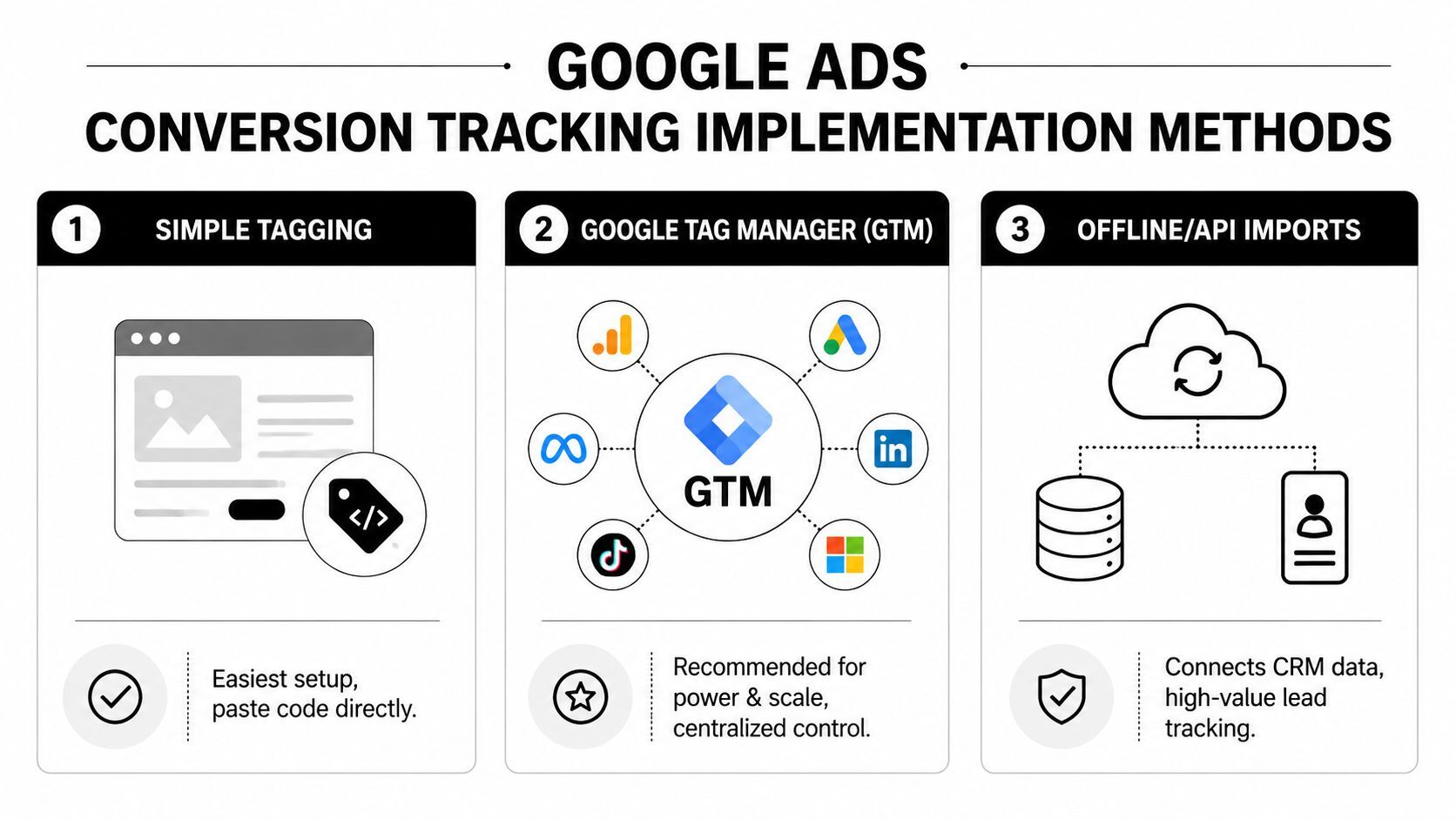
There are three practical paths I care about most. Direct website tagging, Google Tag Manager, and GA4 imports. They are not equal.
Direct tagging works, until it doesn't
The simplest route is placing the Google Tag directly on the site and firing a conversion snippet on the confirmation page or event. This can be fine for a basic site with one clean action and stable development access.
It also creates long-term friction.
Every tracking change becomes a site edit. Every new event depends on a developer or CMS access. Every troubleshooting session gets slower because the logic is spread across templates, plugins, or custom code. For a serious advertiser, that's unnecessary drag.
Use direct tagging if all of these are true:
Your site is simple: One or two primary conversion actions.
Your team needs speed: You need a fast launch and minimal setup overhead.
You accept limited flexibility: You're not planning frequent event changes.
If any of those conditions break, move on.
Google Tag Manager is the professional standard
For most businesses spending aggressively on paid traffic, Google Tag Manager should be the default implementation layer. It centralizes tracking, reduces dependence on developers for routine updates, and gives you visibility into exactly what fires and when.
This is also where the gap between a specialist and a bloated agency gets obvious. A specialist builds a clear container structure, sensible naming conventions, clean triggers, and documentation. A weak agency dumps in tags until nobody wants to touch the account.
Here's the strategic reason GTM matters. Tracking is not static. Conversion actions change. Landing pages change. Consent requirements change. CRM handoffs change. GTM gives you a controlled system instead of a pile of patches.
A practical setup usually includes:
Create the conversion action in Google Ads and capture the Conversion ID and Label.
Install the base Google Tag or deploy the required Google tag logic through GTM.
Fire a Conversion Linker-related setup across pages to preserve attribution behavior and first-party context.
Build a dedicated Google Ads conversion tag for the exact event you care about.
Use a precise trigger, such as a thank-you page view, form success event, or purchase event.
Test in Preview mode before publishing anything.
For teams that need a companion resource on analytics setup, this guide to including Google Analytics properly and stopping wasted ad spend is useful alongside your Google Ads implementation.
Why GTM is stronger for high-spend accounts
The business case is straightforward. According to Stape's summary of 2026 trends, server-side tracking via Google Tag Manager saw 40% year-over-year adoption growth, driven by privacy changes that reduced client-side tracking accuracy by up to 30%. The same source also notes that Google's 2025 performance reports showed GTM-managed campaigns in high-spend accounts correlated with 25% lower CPA, and that enhanced conversions became mandatory for new accounts from Q1 2025 for consent mode v2 compliance. Those details are covered in Stape's guide to Google Ads conversion tracking.
That doesn't mean GTM magically improves performance by itself. It means better implementation quality gives bidding cleaner signals. Cleaner signals produce better optimization.
If your account spends heavily and your tracking still depends on hardcoded snippets scattered across the site, you're operating with unnecessary risk.
A visual walkthrough can help if your team needs to see the implementation flow before touching the container.
GA4 imports are useful, but they are not my first choice for everything
Importing conversions from Google Analytics 4 can be the right move when you want broader multi-channel visibility and don't want duplicate event logic spread across platforms. If GA4 already has robust event tracking in place, import can simplify administration.
But there's a tradeoff. For pure Google Ads optimization, I usually prefer native Google Ads tracking or GTM-based Google Ads tags for key business actions. That gives me tighter control and fewer points of failure.
GA4 import makes the most sense when:
You already maintain clean GA4 event tracking
You need a fuller view across channels
You want to avoid duplicate tag logic
Your analytics governance is strong enough to support it
Here's where teams go wrong with GA4 imports. They assume the event exists, so it must be importable and trustworthy. That's false. The event has to be correctly marked and mapped, and the account has to preserve the attribution plumbing.
A side-by-side decision view
Method |
Good fit |
Main advantage |
Main weakness |
|---|---|---|---|
Direct tag on site |
Small, simple setups |
Fast to launch |
Hard to scale or edit |
Google Tag Manager |
Most serious advertisers |
Control, flexibility, cleaner governance |
Requires disciplined setup |
GA4 import |
Multi-channel measurement |
Shared event framework |
More setup pitfalls for Ads optimization |
My recommendation
If you're a high-spend advertiser, use GTM as your primary implementation layer. Use native Google Ads conversion tags for your most important actions. Use GA4 imports selectively, mainly when cross-channel attribution clarity matters and your analytics setup is already mature.
One practical option if you need help diagnosing the architecture is a structured audit from an independent consultant or a focused resource such as the conversion tracking material published by Come Together Media LLC, which covers tag, trigger, and action setup in a straightforward way.
That's the clean hierarchy. Simple enough to maintain. Strong enough to scale.
Tracking Conversions Beyond the Thank You Page
A thank-you page is fine for basic tracking. It is not enough for a serious lead generation program, a long sales cycle, or any business where actual profit shows up after the initial form fill.
Weak account management falls apart in this scenario. Agencies count the first easy event, declare success, and optimize around shallow signals. A specialist keeps pushing until the measurement reflects the business outcome that matters.

Phone calls need their own strategy
If calls matter to your business, track them separately. Calls from ads and calls from your website are not the same thing, and they shouldn't be lumped together.
Track calls from ads when users tap or dial directly from ad assets. Track calls from the website when someone clicks through first and then calls after landing on the site. Those are distinct behaviors with different campaign implications.
What I care about is call intent. A short accidental call or a spam inquiry should not carry the same weight as a serious consultation call. Structure your call conversion settings so they reflect meaningful lead quality, not just raw call volume.
Use this checklist:
Separate ad-call and site-call actions
Name them clearly in Google Ads
Set them as primary only if they represent real business value
Review call quality outside Google Ads, not just call count
Avoid combining all phone interactions into one conversion bucket
Offline conversion imports close the loop
For high-ticket lead generation, this is the feature that changes the conversation with leadership.
A form submission is not revenue. A booked appointment is closer. A qualified opportunity is better. A closed deal is what finance cares about. Offline conversion importing lets you send that downstream outcome back into Google Ads so the platform can learn from sales, not just inquiries.
The core idea is simple. Capture the click identifier when the ad visit happens, preserve it in your CRM, and upload or sync the later stage outcome when the lead advances. That lets you measure not just volume, but quality.
This matters a lot in categories like healthcare, legal, B2B services, and any consultative sale. Without offline imports, branded campaigns and broad lead magnets often look stronger than they are because they generate cheap front-end actions. Once closed revenue comes back into the account, the picture usually changes.
Track the earliest reliable signal for speed, then import the later revenue signal for truth.
If you're sorting through attribution confusion between ad views, clicks, and delayed outcomes, this explainer on view-through conversions can help clarify what Google Ads is and isn't crediting.
Enhanced conversions are no longer optional in practice
Privacy changes have made old browser-side tracking less complete. That's exactly why Enhanced Conversions matter. They use hashed first-party data, such as customer details submitted on your forms, to improve match quality and recover conversions that would otherwise disappear from the record.
For practical account management, that means more accurate attribution and stronger bidding signals. If your forms collect valid first-party data and your consent setup is in order, enable enhanced conversions for the actions that matter most.
A clean workflow looks like this:
Identify the conversion action that depends on form or purchase data.
Confirm first-party data is captured properly on the site.
Pass the required fields through your implementation layer, usually GTM.
Enable enhanced conversions inside Google Ads for that action.
Validate the setup before relying on it for bidding decisions.
App conversions belong in the same measurement system
If your business advertises an app, track installs and in-app events with the same discipline you apply to web leads or purchases. A download alone may not be the primary goal. Subscription starts, account creation, trial activation, and key in-app actions often matter more.
The mistake I see is fragmented reporting. Web team on one dashboard. App team on another. Paid team working from partial data. Don't tolerate that split if Google Ads is funding user acquisition across both environments.
Primary versus secondary matters more in advanced tracking
Once you start tracking calls, offline outcomes, app events, and enhanced conversions, you need control over what drives bidding.
Use primary conversions for the actions you want Google to optimize toward. Use secondary conversions for supporting signals, diagnostics, and reporting context. That keeps the account from chasing soft actions while still preserving useful visibility.
A common structure looks like this:
Conversion type |
Typical role |
|---|---|
Qualified lead form |
Primary |
Purchase |
Primary |
Strong phone consultation call |
Primary |
Unqualified content download |
Secondary |
Page engagement event |
Secondary |
CRM stage updates for analysis |
Often Secondary until validated |
The business outcome is the real conversion
This is the strategic divide between expert management and checkbox management. A basic setup records that a person did something on a page. A proper setup connects ad spend to business outcomes across calls, sales teams, and revenue systems.
If your current account stops at “thank-you page viewed,” you haven't finished the job. You've just recorded the easiest event.
Verification and Troubleshooting Like a Pro
Tracking isn't reliable because the setup looked clean on launch day. It's reliable because somebody verifies it, challenges it, and checks it again when the site, forms, consent layer, CRM, or campaign structure changes.
I don't trust a conversion action because a dashboard says “active.” I trust it after I've tested the path, validated the trigger, checked the recorded event, and compared the result against what the business expected to happen.
The verification workflow I actually use
Start with the basics before you look for exotic explanations.
Use Google Tag Assistant or GTM Preview to confirm the tag fires on the intended event.
Trigger the action yourself using a controlled test.
Check Google Ads conversion status inside the account.
Review whether the action is primary or secondary so you know whether it should influence bidding.
Confirm value logic if the action should carry revenue or lead value.
Compare with backend systems to spot obvious mismatches early.
That process catches most implementation mistakes fast.
Common failures and the direct fix
Here are the patterns I see most often in audits:
No conversions appearing: Usually the trigger is wrong, the event never fires, or the action was created but not fully implemented.
Double counting: The tag fires on both form submit and thank-you page, or the page can reload and refire.
Wrong values: Static values are applied where dynamic values should be used, or vice versa.
Import confusion: A GA4 event exists, but it was never marked correctly for import.
Attribution gaps: Auto-tagging is off, so click data doesn't connect cleanly.
According to Modo25's guide to Google Ads conversion imports, importing GA4 events can produce 18% higher conversion volume versus last-click by using the default data-driven model. The same source notes that failing to mark GA4 events as key events creates a 60% failure rate, disabled auto-tagging can reduce cross-account attribution by 50%, and successful setup can produce a 12% to 25% ROAS uplift for accounts spending $20,000+ per month.
That tells you two things. GA4 import can be powerful, and it's also easy to botch.
Clean tracking is less about “having tags” and more about proving that the right event is counted once, valued correctly, and attributed in a way the business can trust.
When Google Ads and your CRM disagree
Some discrepancy is normal because systems count differently. But big unexplained gaps usually mean one of three things:
The Ads setup is counting weak or duplicate events
The CRM is missing attribution identifiers or stage mapping
You're comparing different definitions of a conversion
Fix the definition first. Then fix the implementation. Don't start with blame.
If you need a practical reference for diagnosing broken setups, this guide on fixing Google Ads conversion tracking covers the common failure points.
Conclusion From Data Chaos to Decisive Action
Accurate conversion tracking is not a side task. It is the operating system for profitable Google Ads management.
Without it, bidding strategies optimize toward noise. Reports become political documents instead of decision tools. Budget discussions get stuck in opinion because nobody can connect spend to outcomes with confidence. That's why so many high-spend accounts feel busy but underperforming. They aren't short on activity. They're short on trustworthy measurement.
The difference between a specialist and a bloated agency shows up here first. An agency often “sets up tracking” once, checks the box, and moves on. A dedicated PPC consultant builds the measurement framework around how the business makes money, validates it, and keeps refining it as the account evolves. That produces faster decisions, better feedback loops, and less waste.
Do one thing today. Go into Goals > Conversions in your Google Ads account and review your primary conversion actions. If the status isn't recording properly, if the attribution model is still last-click, or if the values don't reflect business reality, you have a measurement problem that is costing you money right now.
You don't need more dashboards. You need cleaner signals.
If your Google Ads account is spending real money and the tracking still feels murky, Come Together Media LLC offers direct, specialist-level help with audits, conversion tracking setup, and PPC management. You work with a dedicated consultant, not a junior account team, so problems get diagnosed faster and fixed with the business outcome in mind.
