



You're spending serious money on Google Ads. The feed is connected, campaigns are live, clicks are coming in, and the agency keeps saying the account is “healthy.” Yet profit doesn't move the way it should.
That usually means the problem isn't Google Shopping itself. It's the management. In high-spend accounts, waste rarely comes from one dramatic mistake. It comes from weak feed data, lazy campaign structure, vague reporting, and automation left unsupervised. That's where specialist-led google shopping ads optimization beats bloated agency process every time.
An experienced consultant examines the elements many advertisers overlook: Merchant Center diagnostics, GTIN coverage, title structure, custom labels, query quality, device behavior, and regional bid pressure. Those details decide whether Shopping becomes a growth channel or an expensive catalog with a media budget attached.
Why Your Shopping Ads Are Leaking Money (And How to Fix It)
If you're a CMO or founder spending heavily on PPC, you've probably seen this pattern. The agency sends a polished deck. CTR is “steady.” Impressions are “strong.” Spend is “fully pacing.” But nobody can explain why your best products aren't getting enough budget, why weak queries keep slipping through, or why the account structure feels like a black box.
That's not a channel issue. That's a management issue.
Google Shopping is too important to run on autopilot. It accounts for 76% of all search ad spend in eCommerce and drives 85.3% of all clicks in combined Google Ads and Shopping campaigns, according to Google Shopping benchmark data from Grow My Ads. The same benchmark cites an average CTR of 0.86% and CPC of $0.66, which tells you something important. There is enough volume and enough efficiency in the channel for strong operators to create an edge.
Most Shopping accounts don't fail because Google stopped working. They fail because nobody is controlling the inputs.
Big agencies often treat Shopping like a maintenance account. A junior account manager checks pacing, glances at asset coverage, and makes surface-level bid adjustments. That's not optimization. That's account babysitting.
A specialist takes a different view. You don't start with “How do we spend budget?” You start with “What is making this account inefficient?” Sometimes the answer is feed quality. Sometimes it's flat campaign architecture. Sometimes it's weak search query control. Usually it's all three.
If you want a useful outside perspective on the broader commercial role of Shopping in driving online sales with PPC, that's a worthwhile companion read. But the short version is simple. Shopping works when the data is clean and the structure is intentional.
The fix is rarely glamorous. It is disciplined. Clean the feed. Rebuild the campaign architecture. Control bids with context. Audit search terms constantly. That's how you stop leakage and turn spend into margin.
The Foundation A Flawless Merchant Center and Product Feed
Most underperforming Shopping accounts have a feed problem long before they have a bidding problem.
That matters because Google Shopping doesn't rely on keyword targeting the way standard search does. Google reads your product data, decides relevance, and then decides whether you deserve the auction. If the feed is incomplete, inconsistent, or vague, you've already handicapped the campaign before the bid even enters the room.
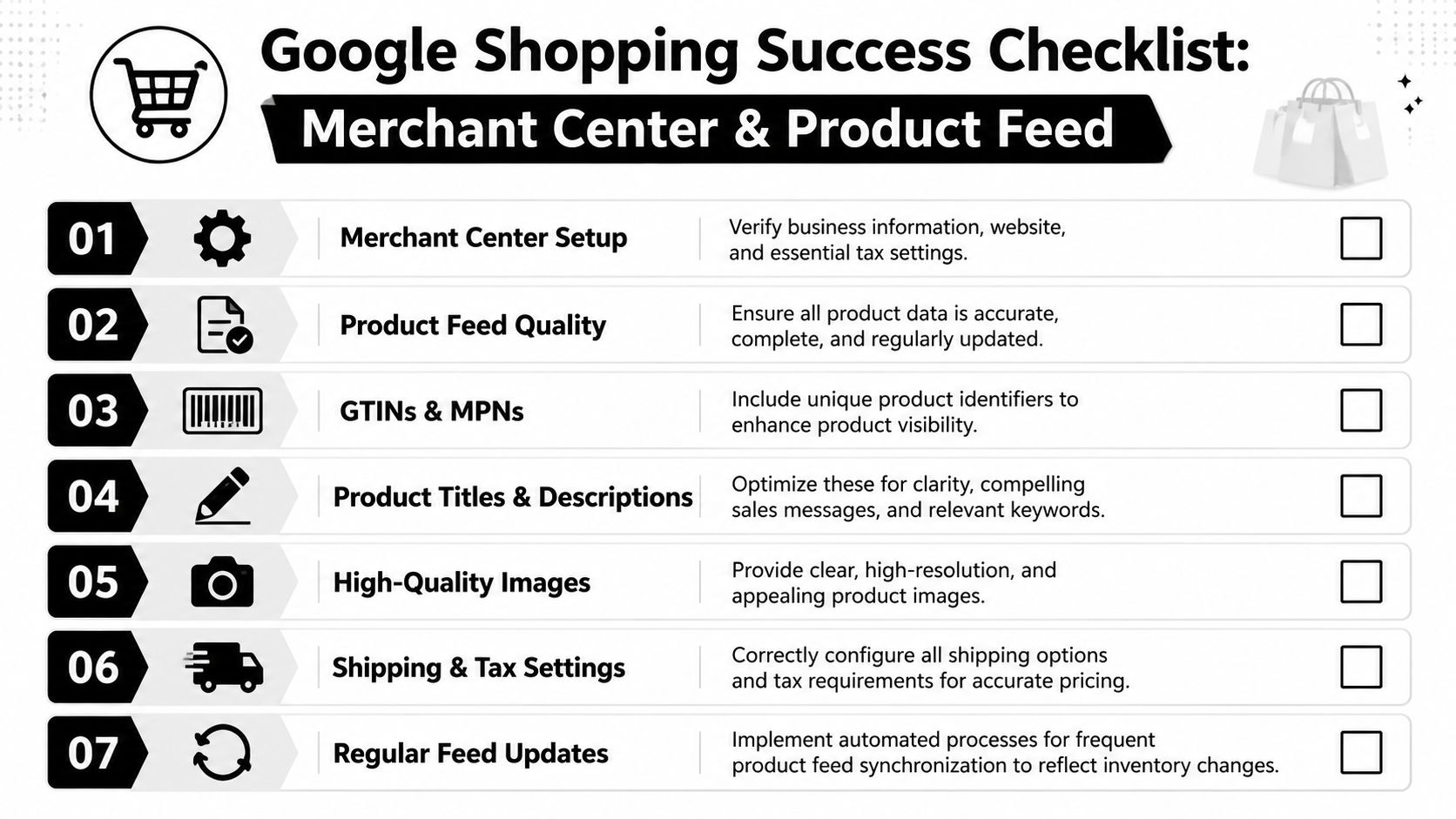
Start with Merchant Center diagnostics
Open Merchant Center before you touch Google Ads. I mean the actual diagnostics, not the summary view someone screenshot for a monthly report.
Look for three things first:
Disapprovals: Any product disapproved for pricing, availability, image issues, or policy problems needs attention immediately.
Warnings: Warnings don't feel urgent until they turn into limited visibility.
Country and shipping setup: Incorrect tax, shipping, or feed targeting settings can damage relevance and trust.
A lot of teams waste time discussing bid strategy while the account is carrying preventable feed errors. That's backwards.
Practical rule: If Merchant Center isn't clean, don't trust any performance conclusion from Google Ads.
Audit the feed fields that actually move performance
Most feeds contain the bare minimum. Product name. price. image. URL. That's enough to get listed. It isn't enough to compete.
The highest-impact feed fields usually include the following:
Title: Put the strongest identifying information first. Brand, product type, major attribute, and differentiator should appear early.
Description: Don't stuff it. Clarify what the product is, who it's for, and what makes it different.
GTIN: If you sell products that require identifiers, include them accurately.
Image link: Use clean, high-quality product imagery that matches the exact item and variant.
Product type: This is for your control and segmentation. Don't waste it.
Custom labels: Use them to classify margin bands, bestsellers, seasonal items, clearance, or strategic priorities.
For practical guidance on feed architecture, this piece on how to optimize your Google Shopping product feed for better results is worth reviewing after your initial audit.
GTINs are not optional when they apply
A lot of marketers treat GTINs like backend admin work. That's a mistake.
According to Google Merchant Center guidance cited in the verified data, 70% of SMBs skip backend feed fields like GTINs, and manual control can yield 15-30% better ROAS in limited-budget accounts. The same verified data states that accounts with accurate GTINs and optimized titles can see a 2x CTR uplift.
Even if you're spending well beyond SMB levels, the lesson still applies. Feed completeness drives visibility and click quality. If identifiers exist, use them correctly.
Fix titles like an operator, not a copywriter
Most agencies either leave titles untouched or rewrite them like ad headlines. Neither approach is good enough.
A Shopping title has one job. Help Google match the product accurately and help the shopper decide quickly. That means clarity first.
Here's a simple working model:
Weak title |
Better title |
|---|---|
Running Shoes |
Brand + model + gender/use case + color |
Office Chair |
Brand + chair type + material + key feature |
Skin Serum |
Brand + product type + core ingredient + size |
You don't need cleverness. You need relevance.
If your creative team is improving image quality at scale, tools and workflows like those covered in the WearView blog on AI photography can help standardize product imagery across a large catalog. That matters more than most ad teams admit, because weak images depress click quality before the landing page even gets a chance.
Use custom labels before you need them
Custom labels are one of the most underused levers in google shopping ads optimization.
Don't wait until the catalog becomes unmanageable. Build labels for:
Margin tiers: High, medium, low
Commercial role: Hero, support, clearance
Seasonality: Evergreen, holiday, launch
Inventory posture: Overstock, standard, low stock
Price bands: Useful for budget control and bid logic
These labels give you control later when you segment campaigns, set reporting views, and isolate spend around business priorities instead of dumping everything into “All products.”
Your feed audit checklist
Run this checklist before any campaign rebuild:
Resolve active disapprovals and review warnings weekly.
Verify GTIN, brand, and MPN coverage where applicable.
Rewrite top-selling product titles based on search intent and product clarity.
Replace low-quality or mismatched images that hurt click quality.
Standardize product_type and custom_labels for future segmentation.
Check pricing and availability sync so landing pages and feed data match.
Review shipping and tax settings for every target market.
A clean feed isn't “setup work.” It's an advantage. Agencies often skip it because it's tedious and hard to package into a pretty report. Specialists obsess over it because it changes outcomes.
Architecting Campaigns for Profit Not Just Clicks
Your account spends through lunch, performance looks fine in the dashboard, and profit is still getting squeezed. I see this pattern in audits constantly. The structure is too loose, Google is filling the gaps, and budget keeps flowing to products and queries that do not deserve it.
That happens when the account is built for coverage instead of control.

Flat structure versus controlled structure
A flat Shopping build gives the system too many decisions and too little business context. High-margin products compete with low-margin products. Proven sellers compete with weak SKUs. Budget spreads out because nothing in the architecture tells Google what matters most.
A controlled structure fixes that. It separates products by commercial value, testing status, and budget priority so you can steer spend where profit is strongest.
This is the difference between managing ads and managing a retail engine.
Use the hero contender catch-all model
For most catalogs, I recommend a three-layer structure because it is simple enough to maintain and strong enough to control spend.
Hero campaigns
Put your proven profit drivers here. These are products with reliable conversion history, healthy margins, and clean inventory. They should get first access to budget and the closest monitoring.
If a product consistently carries the account, stop forcing it to compete with the rest of the catalog.
Contender campaigns
This is your testing layer. New arrivals, rising products, seasonal pushes, and items with signals of promise belong here.
The goal is controlled promotion. Give these products room to earn their way up without letting them drain the budget reserved for products that already perform.
Catch-all campaigns
This layer exists for broad coverage, nothing more. Keep bids conservative, priority low, and expectations realistic.
Use it to pick up residual demand and long-tail traffic. Do not let it become the default home for products that need tighter budget treatment.
A deeper walkthrough of campaign hierarchy is in this guide to Google Ads account structure, and the logic maps well to Shopping.
What the architecture should control
A good Shopping structure should make five things obvious the moment you open the account:
Which products get first claim on budget
Which products are still being tested
Which products only deserve residual traffic
Which product groups reflect margin or strategic value
Which query themes need to be blocked
If you cannot answer those quickly, the account is too vague to optimize well.
Structure exists to control budget, protect profit, and make decisions faster.
Campaign priority and segmentation need a job
Too many accounts use campaign splits that look tidy in a slide deck and do nothing in practice. Segmenting by arbitrary categories without a bidding or reporting reason creates more work and less control.
Every split in the account should answer one of these questions:
Does this group deserve a different budget posture?
Does it need different query control?
Does it justify a different target or bid strategy later?
Does it reflect a real margin or inventory difference?
If the answer is no, keep the structure simpler.
Negative keywords are part of the architecture
Shopping is feed-driven, but search query control still matters. If you ignore negatives, waste builds up through irrelevant modifiers, low-intent searches, and mismatched bargain traffic.
Run search term reviews on a schedule. Add negatives with intent, not in random bursts after a bad week. Block terms that clearly signal poor fit, and use campaign-level exclusions carefully so you do not create overlap or starve the wrong layer.
This is one of the clearest differences between specialist management and agency maintenance. Agencies often stop at setup. Specialists keep shaping traffic after launch.
A simple architecture view
Layer |
Role |
Bid posture |
Product type |
|---|---|---|---|
Hero |
Scale proven winners |
Strong |
Bestsellers, high margin |
Contender |
Test and promote selectively |
Moderate |
Mid-tier, new opportunities |
Catch-all |
Capture residual demand |
Conservative |
Broad catalog spillover |
This kind of build gives you a cleaner read on where profit comes from. It also gives you options. You can move products up when they prove themselves, pull back weak segments without wrecking the whole account, and keep media decisions tied to margin instead of guesswork.
That is how specialists outperform agencies in Shopping. Better structure. Better traffic control. Better budget discipline.
Mastering Bidding and Budget Allocation
Your campaign is spending by 10 a.m., your best products are stuck in “Limited by budget,” and Google is happily buying traffic for low-margin SKUs that should never win the auction in the first place. That is a bidding problem, not a market problem.
High-spend Shopping accounts rarely fail because the bid strategy menu was wrong. They fail because budget is disconnected from margin, conversion data is noisy, and automation is asked to compensate for bad account control. Agencies often call that machine learning. It is usually just expensive drift.
Choose bidding based on signal quality
Start with one question. Can you trust the conversion value going into the account?
If tracking is unstable, returns are distorting revenue, or product groups combine very different margin profiles, aggressive automation will make bad decisions faster. Clean that up first. If conversion value is reliable and product behavior is reasonably consistent, target-based bidding can do useful work.
Use the bid strategy that fits the account you have, not the one Google wants you to adopt this week. If you want a plain-English reference on the options, read this breakdown of Google Ads bidding strategies for different account conditions.
Set targets that reflect profit, not presentation
A target ROAS should come from business math. Too many advertisers pick a number that sounds disciplined in a reporting meeting, then wonder why volume collapses or cheap traffic floods the account.
Set targets by segment. Hero products can usually tolerate a more assertive posture because you know their economics and conversion history. Unproven ranges need tighter control until they prove they deserve more spend. Clearance, low-margin, or operationally awkward products should not share the same bidding logic as your best sellers.
That is the specialist approach. One account. Different rules for different commercial realities.
Budget allocation decides who gets to win
Budgeting is not admin work. It is the main profit lever after feed quality.
A weak budget plan lets average products absorb spend because they have more impressions available. That is how profitable SKUs get crowded out by catalog noise. The fix is straightforward. Push budget toward products and segments that have earned it, and restrict exposure where the economics are thin or uncertain.
Use this filter:
Give proven, high-margin products room to scale
Set controlled budgets for testing ranges and new launches
Protect high-intent geographies that repeatedly produce strong order value
Cut weak regional spend instead of funding it for another month
Shift budget toward hours and days that produce profitable conversion value
Even a strong bid strategy cannot rescue a bad budget split.
Add pressure where the account already shows strength
Once the base bidding model is right, refine pressure based on actual performance patterns.
Geography comes first. Some regions generate stronger conversion rates, higher basket sizes, or fewer low-quality clicks. Fund those regions more aggressively. Stop treating every market as equally valuable.
Time matters too. Shopping demand is rarely flat across the week. Review revenue, conversion value, and efficiency by hour and day. Then put more budget behind the windows that consistently produce profitable orders.
Analysts at Define Digital Academy note that Smart Bidding can improve results when paired with geographic and dayparting decisions. Use that idea carefully. Apply changes only where your own account history shows a real pattern.
Device analysis belongs in the same review. If mobile traffic clicks but does not buy, that is usually a site or checkout issue. Raising bids will not fix friction after the click.
A practical bidding framework
Situation |
Better approach |
|---|---|
Conversion tracking is unreliable |
Fix measurement before trusting automation |
Products have very different margins |
Segment bidding targets by product economics |
Stable conversion value and clean data |
Test target ROAS or value-based bidding |
Specific regions outperform consistently |
Increase budget pressure in those markets |
Clear purchase peaks by hour or day |
Reallocate spend to stronger windows |
One device underperforms after the click |
Fix the user experience before increasing bids |
Poor account management usually breaks in one of two ways. The team either overreacts to daily fluctuations and changes bids constantly, or hands everything to automation and stops making commercial decisions.
The better path is stricter than both. Give Google clean signals, set targets tied to margin, and control budget with intent. That is how you turn bidding from a reporting talking point into an actual profit system.
Navigating the Performance Max Black Box
Performance Max isn't the villain. Bad setup is.
The reason so many advertisers hate PMax is simple. They launched it as a replacement for strategy instead of as an amplifier for strategy. Then they lost visibility, saw mixed-quality traffic, and got stuck with reporting that told them far less than they wanted to know.

If you treat PMax as “set it and forget it,” you'll get exactly the kind of account quality you deserve. Average inputs create average outputs. Loose product data, weak creative, no audience guidance, and vague conversion signals tell Google to go hunt broadly. Broadly is expensive.
When PMax makes sense
PMax can be useful when the account already has the basics under control. The feed is clean. conversion tracking is trustworthy. product segmentation exists. creative assets are intentional. You also need enough patience to evaluate it properly without making random changes every few days.
If those conditions aren't in place, Standard Shopping often gives you cleaner control and cleaner learning.
For merchants running Shopify, this overview of Shopify Google Ads is a good practical reference because platform setup quality has a direct effect on how well Shopping and PMax can perform.
Asset groups are not admin work
A lot of agencies build asset groups as if they're filling out required fields. Headline. image. logo. video. done.
That's lazy.
Asset groups should reflect product categories, customer intent, and merchandising logic. If you lump dissimilar products into one generic bundle of assets, you're forcing Google to make weak creative associations. That lowers relevance and muddies performance signals.
Good asset groups usually have:
Clear product alignment
Category-specific messaging
Relevant imagery
Landing pages that match the user's likely intent
Audience signals that point Google toward higher-quality prospects
Feed the algorithm with better audiences
Audience signals don't limit PMax the way old-school targeting does, but they still matter. They shape the starting point.
Use first-party data wherever possible. Customer lists. remarketing pools. cart abandoners. high-value past purchasers. category viewers. If you have meaningful audience segments, use them.
That doesn't guarantee perfect targeting, but it gives Google a much better opening brief than “find everyone.”
If you give PMax weak signals, it will still spend your money. It just won't spend it wisely.
A quick explainer can help if your team needs a visual refresher before restructuring:
Keep product-level control where you can
The biggest complaint about PMax is lack of transparency. That complaint is fair. But many advertisers make it worse by giving up all internal structure.
Use listing groups thoughtfully. Keep product segmentation clean. Align your feed labels with real business logic so reporting still means something. Even if PMax obscures parts of the path, you can still build enough structure around it to make product-level evaluation possible.
Look for signals like:
Which product groups are driving conversion value
Which asset groups are pulling weak engagement
Where branded demand may be inflating apparent success
Whether new customer acquisition is real or just existing demand getting recaptured
Whether query quality feels broader than it should
PMax should earn more budget, not receive it by default
Too many teams roll budget into Performance Max because Google says it's the future. That's not a reason. That's a platform narrative.
PMax should earn budget based on quality of traffic, quality of revenue, and fit with the business objective. If it's amplifying what already works, great. If it's cannibalizing branded demand, obscuring weak prospecting, or drifting away from profitable products, rein it in.
That's the specialist mindset. You don't reject automation. You supervise it aggressively.
The Rhythm of Optimization Audiences Reporting and Testing
The setup phase matters. The maintenance rhythm matters more.
A good Shopping account doesn't stay good because the original build was smart. It stays good because someone is reviewing the right signals, cutting waste quickly, and testing the parts that can improve performance without destabilizing the whole account.

Build a weekly operating rhythm
You don't need endless dashboards. You need a repeatable routine.
A strong weekly review usually includes:
Search term review: Add negatives, spot intent drift, and find product-title clues.
Merchant Center check: Catch feed issues before they become delivery problems.
Device review: Watch where post-click behavior is weakening.
Budget and pacing review: Confirm hero products aren't losing room to average inventory.
Audience performance scan: Look for remarketing and customer-list opportunities.
This is the sort of practical discipline many brand operators discuss when refining PPC strategies for brand owners. The specifics vary by catalog, but the cadence is what matters.
Mobile deserves its own scrutiny
Too many advertisers still review Shopping performance as if device behavior is a side note. It isn't.
The verified data for this section states that over 70% of Google Shopping ad clicks now originate from mobile devices, and that mobile-first optimization is central to capturing a share of the projected $40 billion in ad revenue, according to Bind Media's Google Shopping statistics.
That should force a few decisions:
Review mobile landing pages first, not last
Shorten and sharpen titles so critical info appears early
Check image clarity on smaller screens
Watch mobile conversion paths for friction
Use device-specific bid logic where the data justifies it
If mobile is driving most clicks and your product page is clumsy on a phone, no amount of bid tinkering will save efficiency.
Audiences should do more than remarket
Advertisers often stop at basic remarketing. That leaves money on the table.
Use audience layers with intent. Returning visitors, cart abandoners, prior customers, and high-value segments all give you different levers for bid pressure and performance analysis. Existing customers may justify stronger product cross-sell pushes. Cart abandoners may deserve firmer bid support on hero products. Category viewers can help sharpen product-group messaging and feed priorities.
The point isn't to build an audience museum. The point is to make bidding and messaging more informed.
Working rule: If every shopper is treated the same, your budget will be spent like every click is equal. It isn't.
Test one variable at a time
A/B testing in Shopping doesn't need to be elaborate. It needs to be disciplined.
Good tests include:
Product title variations Reorder brand, model, size, and differentiators to improve match quality and click appeal.
Primary image changes For eligible products, test cleaner hero imagery against more contextual visuals where policy allows.
Promotional framing Compare standard pricing presentation with sale messaging or promotional emphasis where appropriate.
Campaign experiments Use controlled tests for bidding approaches or structural changes instead of making blind account-wide edits.
Keep the test window clean. Don't change feed titles, bidding strategy, and budget logic all at once, then pretend the result is meaningful.
Reporting should answer business questions
Good reporting isn't a pile of charts. It should answer a few direct questions:
Question |
Why it matters |
|---|---|
Which products are driving profit? |
Protect budget and scale winners |
Which queries are wasting spend? |
Expand negatives and tighten relevance |
Which devices and regions underperform? |
Adjust bids or fix experience |
Which tests improved commercial results? |
Roll out changes with confidence |
That's the rhythm agencies often miss. They report movement. A specialist reports decisions.
From Wasted Spend to a True Profit Center
Google Shopping doesn't need more busywork. It needs sharper control.
When you clean up Merchant Center, tighten the feed, structure campaigns around commercial value, supervise bidding properly, and keep testing with discipline, Shopping stops acting like a spend bucket and starts acting like a profit system. That's the essential shift.
This is also where a specialist has an obvious advantage over a bloated agency. You get direct communication, faster changes, cleaner accountability, and strategy shaped around your actual catalog and margin profile. Not a templated workflow run by whoever had room on the client roster that month.
If your Shopping performance feels stuck, don't ask for another prettier report. Ask harder questions about feed quality, campaign structure, query control, and budget allocation. That's where the money is.
If you want that kind of hands-on review, Come Together Media LLC is built for it. Chase McGowan works as a specialist consultant, not a bloated agency layer, helping brands and high-spend advertisers clean up account structure, improve Google Shopping efficiency, and turn PPC into a more accountable growth channel. If you're tired of generic reporting and want direct, expert-level guidance, start with a conversation.
